BigQuery Agent Analytics plugin for ADK
The BigQuery Agent Analytics Plugin significantly enhances Agent Development Kit (ADK) by providing a robust solution for in-depth agent behavior analysis. Using the ADK Plugin architecture and the BigQuery Storage Write API, it captures and logs critical operational events directly into a Google BigQuery table, empowering you with advanced capabilities for debugging, real-time monitoring, and comprehensive offline performance evaluation.
The plugin also provides Auto Schema Upgrade (safely add new columns to existing tables), Tool Provenance tracking (LOCAL, MCP, SUB_AGENT, A2A, TRANSFER_AGENT, TRANSFER_A2A), HITL Event Tracing for human-in-the-loop interactions, and Automatic View Creation (generate flat, query-friendly event views).
Support for ADK 2.0 multi-agent workflows extends tracing to agent
transfers, state checkpoints, event compaction, and long-running tools. It adds
four new event types: AGENT_TRANSFER, AGENT_STATE_CHECKPOINT,
EVENT_COMPACTION, and TOOL_PAUSED. It also stamps an attributes.adk envelope
on every row so you can reconstruct the agent execution graph and join a paused
tool to the row that resumes it. In Java, this support currently covers the
TOOL_PAUSED event and its pause/resume pairing keys only (without the
attributes.adk envelope). See Agent workflow and pause/resume events
(ADK 2.0) for details.
The plugin includes three reliability and observability fixes (Java: v1.7.0 or later):
- Cross-region Storage Write API routing. Writes to BigQuery datasets
outside the
USmulti-region (for exampleEUornorthamerica-northeast1) now route to the region that owns the write stream. Previously they could fail with a "session not found" / stream-not-found error and silently drop every row. - Delivery and content-incident observability. Delivery losses are tracked
per reason. Python also counts formatter and parser failures where a sentinel
row is written. The counters are exposed through
BigQueryAgentAnalyticsPlugin.get_drop_stats()(Python) orgetDropStats()(Java), so a host can poll and export them to its own monitoring. The reason keys and semantics differ per language; see Dropped-event observability. - No duplicate spans in Cloud Trace. When Agent Engine telemetry
(
GOOGLE_CLOUD_AGENT_ENGINE_ENABLE_TELEMETRY=true) or any other Cloud Trace exporter is wired to the global tracer provider, the plugin no longer produces a duplicate span next to each framework span. The plugin still inheritstrace_idfrom the ambient OTel span, so BigQuery rows continue to join cleanly to Cloud Trace traces.
In Python v2.7.0 and later, every row also receives a stable event_id before
it enters the write queue. The ID is preserved across Storage Write API
retries, so consumers can identify retry duplicates. An opt-in
exactly_once_delivery mode uses committed streams and explicit offsets to
prevent duplicates from ambiguous retries within a live processor. This mode
does not guarantee lossless delivery; see Delivery and
deduplication.
The same Python release adds model and workflow termination details. Final
LLM_RESPONSE rows include finish_reason and, when supplied by the model,
a sanitized error_message. Workflow nodes can emit NODE_OUTPUT and
NODE_ERROR, and unhandled agent or run exceptions emit AGENT_ERROR and
INVOCATION_ERROR.
BigQuery Storage Write API
This feature uses BigQuery Storage Write API, which is a paid service. For information on costs, see the BigQuery documentation.
Kotlin support
The Kotlin plugin logs invocation lifecycle events. It writes an
INVOCATION_STARTING row when an invocation begins and an
INVOCATION_COMPLETED row when it ends, and creates the partitioned,
clustered events table on first use if it does not already exist.
Rows are inserted one at a time through tabledata.insertAll, synchronously
on the invocation path, rather than through the Storage Write API used by
Python and Java.
The following are not implemented in Kotlin: LLM, tool, agent, state, HITL and A2A events; the ADK 2.0 workflow events; automatic view creation; Auto Schema Upgrade; tool provenance; GCS offloading; and drop statistics.
Use cases
- Agent workflow debugging and analysis: Capture a wide range of plugin lifecycle events (LLM calls, tool usage) and agent-yielded events (user input, model responses), into a well-defined schema.
- High-volume analysis and debugging: Logging operations are performed asynchronously using the Storage Write API to allow high throughput and low latency.
- Multimodal Analysis: Log and analyze text, images, and other modalities. Large files are offloaded to GCS, making them accessible to BigQuery ML via Object Tables.
- Distributed Tracing: Built-in support for OpenTelemetry-style tracing
(
trace_id,span_id) to visualize agent execution flows. - Tool Provenance: Track the origin of each tool call (local function, MCP server, sub-agent, A2A remote agent, or transfer agent).
- Human-in-the-Loop (HITL) Tracing: Dedicated event types for credential requests, confirmation prompts, and user input requests.
- Agent Workflow Tracing (ADK 2.0): Capture agent transfers, state
checkpoints, event compaction, and long-running tool pause/resume, with an
attributes.adkenvelope for reconstructing the execution graph. - Queryable Event Views: Automatically create flat, per-event-type BigQuery
views (e.g.,
v_llm_request,v_tool_completed) to simplify downstream analytics by unnesting JSON payload data.
Captured events summary
The following table lists all event types the plugin logs. For detailed payload
examples, see Event types and payloads. The View column
shows the optional BigQuery view. Python creates views by default; Java creates
them only when createViews(true) is configured.
In Kotlin, the plugin logs INVOCATION_STARTING and INVOCATION_COMPLETED
only and creates no views, so the other rows and the entire View column
apply to Python and Java.
The table is the union of the Python and Java event sets. INVOCATION_ERROR,
AGENT_ERROR, AGENT_TRANSFER, AGENT_STATE_CHECKPOINT,
EVENT_COMPACTION, NODE_OUTPUT, and NODE_ERROR are Python-only. Java emits
TOOL_PAUSED, but none of the other workflow-specific events. The remaining
rows apply to both languages.
| Event Type | Captured When | Key Payload Fields | View |
|---|---|---|---|
USER_MESSAGE_RECEIVED |
A user message enters the invocation | text summary / content parts | v_user_message_received |
INVOCATION_STARTING |
An invocation begins | (common columns only) | v_invocation_starting |
INVOCATION_COMPLETED |
An invocation ends | (common columns only) | v_invocation_completed |
INVOCATION_ERROR |
An invocation fails with an unhandled exception | error message, sanitized traceback | v_invocation_error |
AGENT_STARTING |
Agent execution begins | instruction summary | v_agent_starting |
AGENT_COMPLETED |
Agent execution ends | latency | v_agent_completed |
AGENT_ERROR |
Agent execution fails with an unhandled exception | error message, sanitized traceback, latency | v_agent_error |
LLM_REQUEST |
A model request is sent | model, prompt, config, tools | v_llm_request |
LLM_RESPONSE |
A model response is received | response, usage tokens, cache metadata, finish reason, latency, TTFT | v_llm_response |
LLM_ERROR |
A model call fails | error message, latency | v_llm_error |
TOOL_STARTING |
A tool begins execution | tool name, args, origin | v_tool_starting |
TOOL_COMPLETED |
A tool succeeds | tool name, result, origin, latency | v_tool_completed |
TOOL_ERROR |
A tool fails | tool name, args, origin, error, latency | v_tool_error |
STATE_DELTA |
Session state changes | state delta | v_state_delta |
HITL_CREDENTIAL_REQUEST |
Credential request is emitted | synthetic tool name, args | v_hitl_credential_request |
HITL_CONFIRMATION_REQUEST |
Confirmation request is emitted | synthetic tool name, args | v_hitl_confirmation_request |
HITL_INPUT_REQUEST |
User input request is emitted | synthetic tool name, args | v_hitl_input_request |
HITL_CREDENTIAL_REQUEST_COMPLETED |
User provides credential response | synthetic tool name, result | (base table only) |
HITL_CONFIRMATION_REQUEST_COMPLETED |
User provides confirmation response | synthetic tool name, result | (base table only) |
HITL_INPUT_REQUEST_COMPLETED |
User provides input response | synthetic tool name, result | (base table only) |
A2A_INTERACTION |
Remote A2A call completes | response, task ID, context ID, request/response | v_a2a_interaction |
AGENT_RESPONSE |
Final agent response is yielded | response (content), source event ID/author/branch (attributes) | v_agent_response |
AGENT_TRANSFER |
One agent hands off control to another | from agent, to agent, source event ID | v_agent_transfer |
AGENT_STATE_CHECKPOINT |
An agent snapshots its state (or marks the end of its run) | agent state, end-of-agent flag, source event ID | v_agent_state_checkpoint |
EVENT_COMPACTION |
A window of events is compacted into a summary | window start/end timestamps, compacted content | v_event_compaction |
TOOL_PAUSED |
A long-running tool (or HITL request) suspends, awaiting resumption | tool name, args, pause kind, function call ID | v_tool_paused |
NODE_OUTPUT |
A workflow node emits a final structured output | output, node path, run ID, parent run ID | v_node_output |
NODE_ERROR |
A workflow node ends with a non-model error | error code, error message, node path, run ID, parent run ID | v_node_error |
Installation
For Python, install ADK with the dedicated BigQuery Agent Analytics extra. The
extra includes the BigQuery clients, Cloud Storage client, and pyarrow
required by the plugin:
The pyarrow dependency is no longer included in the general gcp extra. If
pyarrow is missing, the plugin's import error identifies the
bigquery-analytics extra to install.
Quickstart
Add the plugin to your agent's App object. For prerequisites, see
Prerequisites.
import os
from google.adk.agents import Agent
from google.adk.apps import App
from google.adk.models.google_llm import Gemini
from google.adk.plugins.bigquery_agent_analytics_plugin import BigQueryAgentAnalyticsPlugin

os.environ['GOOGLE_CLOUD_PROJECT'] = 'your-gcp-project-id'
os.environ['GOOGLE_CLOUD_LOCATION'] = 'us-central1'
os.environ['GOOGLE_GENAI_USE_ENTERPRISE'] = 'True'

plugin = BigQueryAgentAnalyticsPlugin(
    project_id="your-gcp-project-id",
    dataset_id="your-big-query-dataset-id",
)

root_agent = Agent(
    model=Gemini(model="gemini-flash-latest"),
    name='my_agent',
    instruction="You are a helpful assistant.",
)

app = App(
    name="my_agent",
    root_agent=root_agent,
    plugins=[plugin],
)
Add the plugin to your runner's plugins list. For prerequisites, see Prerequisites.
import com.google.adk.agents.LlmAgent;
import com.google.adk.agents.RunConfig;
import com.google.adk.models.Gemini;
import com.google.adk.plugins.Plugin;
import com.google.adk.plugins.agentanalytics.BigQueryAgentAnalyticsPlugin;
import com.google.adk.plugins.agentanalytics.BigQueryLoggerConfig;
import com.google.adk.runner.InMemoryRunner;
import com.google.common.collect.ImmutableList;

public final class Agent {
  public static void main(String[] args) throws Exception {
    Plugin bqLoggingPlugin = new BigQueryAgentAnalyticsPlugin(
        BigQueryLoggerConfig.builder()
            .projectId("your-gcp-project-id")
            .datasetId("your-big-query-dataset-id")
            .tableName("agent_events") // Optional; default in v1.8.0+
            .build());

    InMemoryRunner runner = new InMemoryRunner(
        LlmAgent.builder()
            .model(Gemini.builder().modelName("gemini-2.5-flash").build())
            .name("my_agent")
            .instruction("You are a helpful assistant.")
            .build(),
        "my_agent",
        ImmutableList.of(bqLoggingPlugin));

    // Use runner ...

    // Close runner to flush and close plugin
    runner.close().blockingAwait();
  }
}
Add the plugin to your agent's App object. For prerequisites, see
Prerequisites. The plugin is JVM-only and ships outside
core, so add the integrations artifact:
import com.google.adk.kt.agents.Instruction
import com.google.adk.kt.agents.LlmAgent
import com.google.adk.kt.apps.App
import com.google.adk.kt.models.Gemini
import com.google.adk.kt.plugins.agentanalytics.BigQueryAgentAnalyticsPlugin
import com.google.adk.kt.plugins.agentanalytics.BigQueryLoggerConfig

val analyticsAgent =
    LlmAgent(
        name = "my_agent",
        model = Gemini(name = "gemini-flash-latest"),
        instruction = Instruction("You are a helpful assistant."),
    )

/**
 * Wraps [analyticsAgent] in an [App] whose invocations are logged to BigQuery.
 *
 * The plugin creates the day-partitioned table on first use, so the credentials
 * in scope need permission to create a table in the dataset, not only to insert
 * rows. Without explicit `credentials`, application default credentials are used.
 *
 * Logging failures never fail the turn: a table that cannot be created, or a row
 * that cannot be inserted, is logged and the invocation carries on.
 */
fun analyticsApp(
    projectId: String,
    datasetId: String,
    datasetLocation: String,
): App {
    val plugin =
        BigQueryAgentAnalyticsPlugin(
            config =
                BigQueryLoggerConfig(
                    projectId = projectId,
                    datasetId = datasetId,
                    // Defaults to "US"; pass your dataset's location instead.
                    location = datasetLocation,
                ),
        )

    return App(
        appName = "my_agent",
        rootAgent = analyticsAgent,
        plugins = listOf(plugin),
    )
}
The plugin creates the events table on first use, so the credentials in
scope need permission to create a table in the dataset, not only to insert
rows. Set location to your dataset's location; it defaults to "US". For
the full set of options, see Configuration
options.
Logging never fails the turn: if the table cannot be created or a row cannot
be inserted, the plugin logs the error and the invocation continues. When
rows are missing, enable logging for
com.google.adk.kt.plugins.agentanalytics.BigQueryAgentAnalyticsPlugin —
logs are emitted under that class name, not under the plugin's ADK name
(bigquery_agent_analytics).
Run and test agent
Test the plugin by running the agent and making a few requests through the chat
interface, such as "tell me what you can do" or "List datasets in my cloud
project
SELECT timestamp, event_type, content
FROM `your-gcp-project-id.your-big-query-dataset-id.agent_events`
ORDER BY timestamp DESC
LIMIT 20;
Full example with GCS offloading, OpenTelemetry, and BigQuery tools
# my_bq_agent/agent.py
import os
import google.auth
from google.adk.apps import App
from google.adk.plugins.bigquery_agent_analytics_plugin import BigQueryAgentAnalyticsPlugin, BigQueryLoggerConfig
from google.adk.agents import Agent
from google.adk.models.google_llm import Gemini
from google.adk.tools.bigquery import BigQueryToolset, BigQueryCredentialsConfig


# --- OpenTelemetry note (no setup required for BQAA) ---
# The BQAA plugin does NOT export OTel spans of its own. It tracks the
# parent-child hierarchy on an internal stack: the root invocation span
# reuses the ambient OTel span's id (as a 16-hex string) when one is
# active, and child BQAA spans are generated internally as 16-hex
# strings. The plugin's `trace_id`
# column inherits from whichever OpenTelemetry span is active in the
# surrounding runtime when the agent runs:
#   * Agent Engine wires its invocation span automatically, so
#     `trace_id` in BigQuery joins to Cloud Trace out of the box.
#   * Locally, framework-instrumented runners open an invocation span
#     for you.
#   * If neither is available, the plugin falls back to a per-invocation
#     trace_id and the parent-child hierarchy is still preserved in
#     BigQuery; no OTel setup needed.
# Setting a bare `TracerProvider` with no ambient span will NOT cause
# `trace_id` to be populated with a "real" OTel id; only an *active*
# span does. See the "Tracing and observability" section for details.

# --- Configuration ---
PROJECT_ID = os.environ.get("GOOGLE_CLOUD_PROJECT", "your-gcp-project-id")
DATASET_ID = os.environ.get("BIG_QUERY_DATASET_ID", "your-big-query-dataset-id")
# GOOGLE_CLOUD_LOCATION must be a valid Agent Platform region (e.g., "us-central1").
# BQ_LOCATION is the BigQuery dataset location, which can be a multi-region
# like "US" or "EU", or a single region like "us-central1".
VERTEX_LOCATION = os.environ.get("GOOGLE_CLOUD_LOCATION", "us-central1")
BQ_LOCATION = os.environ.get("BQ_LOCATION", "US")
GCS_BUCKET = os.environ.get("GCS_BUCKET_NAME", "your-gcs-bucket-name") # Optional

if PROJECT_ID == "your-gcp-project-id":
    raise ValueError("Please set GOOGLE_CLOUD_PROJECT or update the code.")

# --- CRITICAL: Set environment variables BEFORE Gemini instantiation ---
os.environ['GOOGLE_CLOUD_PROJECT'] = PROJECT_ID
os.environ['GOOGLE_CLOUD_LOCATION'] = VERTEX_LOCATION
os.environ['GOOGLE_GENAI_USE_ENTERPRISE'] = 'True'

# --- Initialize the Plugin with Config ---
bq_config = BigQueryLoggerConfig(
    enabled=True,
    gcs_bucket_name=GCS_BUCKET, # Enable GCS offloading for multimodal content
    log_multi_modal_content=True,
    max_content_length=500 * 1024, # 500 KB limit for inline text
    batch_size=1, # Default is 1 for low latency, increase for high throughput
    shutdown_timeout=10.0
)

bq_logging_plugin = BigQueryAgentAnalyticsPlugin(
    project_id=PROJECT_ID,
    dataset_id=DATASET_ID,
    table_id="agent_events", # default table name is agent_events
    config=bq_config,
    location=BQ_LOCATION
)

# --- Initialize Tools and Model ---
credentials, _ = google.auth.default(scopes=["https://www.googleapis.com/auth/cloud-platform"])
bigquery_toolset = BigQueryToolset(
    credentials_config=BigQueryCredentialsConfig(credentials=credentials)
)

llm = Gemini(model="gemini-flash-latest")

root_agent = Agent(
    model=llm,
    name='my_bq_agent',
    instruction="You are a helpful assistant with access to BigQuery tools.",
    tools=[bigquery_toolset]
)

# --- Create the App ---
app = App(
    name="my_bq_agent",
    root_agent=root_agent,
    plugins=[bq_logging_plugin],
)
package adk.plugins.agentanalytics.demo;

import static java.nio.charset.StandardCharsets.UTF_8;
import static java.util.Collections.singletonList;

import com.google.adk.agents.LlmAgent;
import com.google.adk.agents.RunConfig;
import com.google.adk.events.Event;
import com.google.adk.models.Gemini;
import com.google.adk.plugins.Plugin;
import com.google.adk.plugins.agentanalytics.BigQueryAgentAnalyticsPlugin;
import com.google.adk.plugins.agentanalytics.BigQueryLoggerConfig;
import com.google.adk.runner.InMemoryRunner;
import com.google.adk.sessions.Session;
import com.google.adk.tools.FunctionTool;
import com.google.adk.tools.ToolContext;
import com.google.genai.types.Content;
import com.google.genai.types.GenerateContentConfig;
import com.google.genai.types.Part;
import io.opentelemetry.sdk.OpenTelemetrySdk;
import io.opentelemetry.sdk.common.CompletableResultCode;
import io.opentelemetry.sdk.trace.SdkTracerProvider;
import io.opentelemetry.sdk.trace.data.SpanData;
import io.opentelemetry.sdk.trace.export.SimpleSpanProcessor;
import io.opentelemetry.sdk.trace.export.SpanExporter;
import io.reactivex.rxjava3.core.Flowable;
import java.util.Collection;
import java.util.Scanner;

/** Demo agent showing how to use BigQueryAgentAnalyticsPlugin. */
public final class BqDemoAgent {
  private static final String PROJECT_ID = "your-gcp-project-id";
  private static final String DATASET_ID = "your-gcp-dataset_id";
  private static final String TABLE_ID = "your-gcp-table";
  private static final String GCS_BUCKET_NAME = "your-gcs-bucket-name";
  private static final String API_KEY = "your-api_key";

  // A simple tool to demonstrate tool execution logging
  public static String reverseString(String input, ToolContext toolContext) {
    return new StringBuilder(input).reverse().toString();
  }

  public static void main(String[] args) throws Exception {
    // 0. Initialize OpenTelemetry
    initOpenTelemetry();

    // 1. Configure the BigQuery Logger
    BigQueryLoggerConfig config =
        BigQueryLoggerConfig.builder()
            .projectId(PROJECT_ID)
            .datasetId(DATASET_ID)
            .tableName(TABLE_ID)
            .gcsBucketName(GCS_BUCKET_NAME)
            .createViews(true)
            .build();

    // 2. Create the plugin instance
    Plugin bqLoggingPlugin = new BigQueryAgentAnalyticsPlugin(config);

    // 3. Initialize the model (Gemini)
    Gemini model =
        Gemini.builder()
            .modelName("gemini-3-flash-preview") // Use appropriate model
            .apiKey(API_KEY)
            .build();

    // 4. Create the agent with the tool and plugin
    LlmAgent agent =
        LlmAgent.builder()
            .model(model)
            .name("bq_demo_agent")
            .instruction(
                "You are a helpful assistant. You have a tool 'reverseString' that you can use to"
                    + " reverse text.")
            .tools(FunctionTool.create(BqDemoAgent.class, "reverseString"))
            .generateContentConfig(GenerateContentConfig.builder().temperature(0.5f).build())
            .build();

    // 5. Initialize the runner
    InMemoryRunner runner =
        new InMemoryRunner(agent, "bq_demo_agent", singletonList(bqLoggingPlugin));

    // 6. Create a session
    Session session =
        runner.sessionService().createSession(runner.appName(), "demo_user").blockingGet();

    RunConfig runConfig = RunConfig.builder().build();

    System.out.println("Agent ready. Type 'quit' to exit.");

    try (Scanner scanner = new Scanner(System.in, UTF_8)) {
      while (true) {
        System.out.print("\nUser: ");
        String userInput = scanner.nextLine();
        if (userInput.trim().equalsIgnoreCase("quit")) {
          break;
        }

        Content userMsg = Content.fromParts(Part.fromText(userInput));

        // Run the agent and stream events
        Flowable<Event> events =
            runner.runAsync(session.userId(), session.id(), userMsg, runConfig);

        System.out.print("Agent: ");
        events.blockingForEach(
            event -> {
              if (event.finalResponse()) {
                System.out.println(event.stringifyContent());
              }
            });
      }
    } finally {
      System.out.println("Closing runner (flushing remaining logs)...");
      runner.close().blockingAwait();
      System.out.println("Done.");
    }
  }

  private static void initOpenTelemetry() {
    PrintingSpanExporter exporter = new PrintingSpanExporter();
    SdkTracerProvider tracerProvider =
        SdkTracerProvider.builder().addSpanProcessor(SimpleSpanProcessor.create(exporter)).build();
    OpenTelemetrySdk.builder().setTracerProvider(tracerProvider).buildAndRegisterGlobal();
  }

  private static class PrintingSpanExporter implements SpanExporter {
    @Override
    public CompletableResultCode export(Collection<SpanData> spans) {
      for (SpanData span : spans) {
        System.out.println("--- Span: " + span.getName() + " ---");
        System.out.println("  TraceId: " + span.getTraceId());
        System.out.println("  SpanId: " + span.getSpanId());
        System.out.println("  ParentSpanId: " + span.getParentSpanId());
        System.out.println("  Attributes: " + span.getAttributes());
        System.out.println("------------------------");
      }
      return CompletableResultCode.ofSuccess();
    }

    @Override
    public CompletableResultCode flush() {
      return CompletableResultCode.ofSuccess();
    }

    @Override
    public CompletableResultCode shutdown() {
      return CompletableResultCode.ofSuccess();
    }
  }

  private BqDemoAgent() {}
}
Deploying to Agent Runtime?
Prerequisites
- Google Cloud Project with the BigQuery API enabled.
- BigQuery Dataset: Create a dataset to store logging tables before using the plugin. The plugin automatically creates the necessary events table within the dataset if the table does not exist.
- Google Cloud Storage Bucket (Optional): If you plan to log multimodal content (images, audio, etc.), creating a GCS bucket is recommended for offloading large files.
- Authentication:
- Local: Run
gcloud auth application-default login. - Cloud: Ensure your service account has the required permissions.
- Local: Run
Note: Gemini model selector gemini-flash-latest
Most code examples in ADK documentation use gemini-flash-latest to select
the latest available
Gemini Flash version. However, if you access Gemini from a regional
endpoint, such as us-central1, this selection string may not work. In that
case, use a specific model version string from the Gemini
models page or Google Cloud
Gemini
models
list.
IAM permissions
For the agent to work properly, the principal (e.g., service account, user account) under which the agent is running needs these Google Cloud roles:
roles/bigquery.jobUserat Project Level to run BigQuery queries.roles/bigquery.dataEditorat Table Level to write log/event data.- If using GCS offloading:
roles/storage.objectCreatorandroles/storage.objectVieweron the target bucket.
Configuration options
Constructor parameters
The BigQueryAgentAnalyticsPlugin constructor accepts these parameters. It also
accepts **kwargs, which are forwarded directly to BigQueryLoggerConfig (see
below).
| Parameter | Type | Default | Use when |
|---|---|---|---|
project_id |
str |
(required) | Select the Google Cloud project |
dataset_id |
str |
(required) | Select the BigQuery dataset |
table_id |
Optional[str] |
None |
Use a custom table name (overrides config table_id) |
config |
Optional[BigQueryLoggerConfig] |
None |
Pass a config object for detailed tuning |
location |
str |
"US" |
Match the BigQuery dataset location (e.g., "US", "EU", "us-central1") |
credentials |
Optional[google.auth.credentials.Credentials] |
None |
Use explicit service-account, impersonated, or cross-project credentials instead of ADC |
plugin = BigQueryAgentAnalyticsPlugin(
    project_id="my-project",
    dataset_id="my_dataset",
    batch_size=10,           # forwarded to BigQueryLoggerConfig
    shutdown_timeout=5.0,    # forwarded to BigQueryLoggerConfig
)
BigQueryLoggerConfig options
All options below are optional and have sensible defaults. Pass them to
BigQueryLoggerConfig or as **kwargs to the plugin constructor.
| Option | Type | Default | Use when |
|---|---|---|---|
enabled |
bool |
True |
Temporarily disable logging |
table_id |
str |
"agent_events" |
Use a custom table name (constructor value takes precedence) |
clustering_fields |
List[str] |
["event_type", "agent", "user_id"] |
Customize table clustering on creation |
gcs_bucket_name |
Optional[str] |
None |
Offload large text and multimodal content to GCS |
connection_id |
Optional[str] |
None |
Use BigQuery ObjectRef / object tables (e.g., us.my-connection) |
max_content_length |
int |
500 * 1024 |
Control inline payload size before offloading/truncating |
batch_size |
int |
1 |
Tune write throughput vs. latency |
batch_flush_interval |
float |
1.0 |
Flush partial batches periodically (seconds) |
shutdown_timeout |
float |
10.0 |
Wait for final flush on shutdown (seconds) |
event_allowlist |
Optional[List[str]] |
None |
Log only selected event types |
event_denylist |
Optional[List[str]] |
None |
Skip sensitive or noisy event types |
content_formatter |
Optional[Callable] |
None |
Apply custom masking/formatting per event (receives (content, event_type)) |
log_multi_modal_content |
bool |
True |
Capture content_parts details including GCS references |
queue_max_size |
int |
10000 |
Bound the in-memory event queue |
retry_config |
RetryConfig |
RetryConfig() |
Tune retry behavior (max_retries=3, initial_delay=1.0, multiplier=2.0, max_delay=10.0) |
log_session_metadata |
bool |
True |
Add session info to attributes (session_id, app_name, user_id, state). Keys prefixed temp: are redacted. |
custom_tags |
Dict[str, Any] |
{} |
Add static tags (e.g., {"env": "prod"}) to every event's attributes |
auto_schema_upgrade |
bool |
True |
Automatically add new columns to existing tables (additive only) |
create_views |
bool |
True |
Create per-event-type BigQuery views |
view_prefix |
str |
"v" |
Avoid view-name collisions when multiple plugins share a dataset (e.g., "v_staging") |
enable_otel_correlation |
bool |
False |
Capture the ambient OpenTelemetry span context into attributes.otel.{span_id, trace_id} as a best-effort Cloud Trace join key |
custom_metadata_allowlist |
Optional[List[str]] |
None |
Capture selected event.custom_metadata keys into attributes.custom_metadata.*: exact keys or "prefix*" patterns |
payload_column_denylist |
Optional[List[str]] |
None |
Project payload columns (content, content_parts, attributes, latency_ms) out of the table at write time |
final_response_tool_names |
FrozenSet[str] |
frozenset() |
Log call arguments from selected successful tools as AGENT_RESPONSE payloads |
flush_on_run_end |
bool |
True |
Wait for queued rows to finish writing at the end of each run |
exactly_once_delivery |
bool |
False |
Use committed streams and explicit offsets to prevent ambiguous-retry duplicates within a live processor |
The following code sample shows how to define a configuration for the BigQuery Agent Analytics plugin:
import json
import re
from typing import Any

from google.adk.plugins.bigquery_agent_analytics_plugin import BigQueryLoggerConfig

def redact_dollar_amounts(event_content: Any, event_type: str) -> str:
    """
    Custom formatter to redact dollar amounts (e.g., $600, $12.50)
    and ensure JSON output if the input is a dict.

    Args:
        event_content: The raw content of the event.
        event_type: The event type string (e.g., "LLM_REQUEST", "LLM_RESPONSE").
    """
    text_content = ""
    if isinstance(event_content, dict):
        text_content = json.dumps(event_content)
    else:
        text_content = str(event_content)

    # Regex to find dollar amounts: $ followed by digits, optionally with commas or decimals.
    # Examples: $600, $1,200.50, $0.99
    redacted_content = re.sub(r'\$\d+(?:,\d{3})*(?:\.\d+)?', 'xxx', text_content)

    return redacted_content

config = BigQueryLoggerConfig(
    enabled=True,
    event_allowlist=["LLM_REQUEST", "LLM_RESPONSE"], # Only log these events
    # event_denylist=["TOOL_STARTING"], # Skip these events
    shutdown_timeout=10.0, # Wait up to 10s for logs to flush on exit
    max_content_length=500, # Truncate content to 500 chars
    content_formatter=redact_dollar_amounts, # Redact the dollar amounts in the logging content
    queue_max_size=10000, # Max events to hold in memory
    auto_schema_upgrade=True, # Automatically add new columns to existing tables
    create_views=True, # Automatically create per-event-type views
    # retry_config=RetryConfig(max_retries=3), # Optional: Configure retries
)

plugin = BigQueryAgentAnalyticsPlugin(
    project_id="my-project",
    dataset_id="my_dataset",
    config=config,
)
Trace correlation, metadata capture, and column projection
Three options control what extra context lands in attributes and whether
payload columns are written at all. Each is listed in the
BigQueryLoggerConfig options table above; the notes below add the
cross-option rules the flat table can't express:
enable_otel_correlation: The captured span context is a best-effort Cloud Trace correlation key, not a foreign key; when disabled (the default) noattributes.otelis written.custom_metadata_allowlist: Leaving it unset preserves the previous behavior, where only the built-ina2a:*capture runs. Captured values pass the same safety pipeline as all other logged content (truncation, sensitive-key redaction, circular-reference handling).payload_column_denylist: Onlycontent,content_parts,attributes, andlatency_msmay be listed; identity and correlation columns are protected and raiseValueError. The projection is applied schema-first, so the table schema, the written rows, and the auto-created views stay consistent (views drop derived columns that depend on a denied column). Denyingattributesalso disablesattributes.otelandattributes.custom_metadata, and combining it with a non-emptycustom_metadata_allowlistis rejected at construction.
config = BigQueryLoggerConfig(
    enable_otel_correlation=True,                      # join key against Cloud Trace
    custom_metadata_allowlist=["ticket_id", "exp:*"],  # capture selected custom_metadata keys
    # payload_column_denylist=["content_parts"],       # don't persist multimodal payloads
)
Final-answer capture and end-of-run flushing
Use final_response_tool_names when an agent delivers its final answer by
calling a dedicated tool instead of yielding a plain-text final event. On a
successful matching tool call, the plugin writes the tool's call arguments
as an AGENT_RESPONSE row and adds source_tool to attributes.
The flush_on_run_end option defaults to True, which makes
after_run_callback wait for the current event loop's write queue. Set it
to False to remove that flush from the response path; the background
writer will continue draining the queue, so rows may appear in BigQuery
shortly after the run returns.
config = BigQueryLoggerConfig(
    final_response_tool_names=frozenset({"submit_final_response"}),
    flush_on_run_end=False,
)
Delivery and deduplication
Every row receives a 32-character hexadecimal event_id before enqueue.
The same ID is reused when the Storage Write API retries that row, making it
the deduplication key in the default delivery mode:
SELECT *
FROM `your-gcp-project-id.adk_agent_logs.agent_events`
QUALIFY
  event_id IS NULL
  OR ROW_NUMBER() OVER (PARTITION BY event_id ORDER BY timestamp) = 1;
The event_id IS NULL condition retains rows written before the column was
introduced.
Set exactly_once_delivery=True to use one loop-local committed stream and
explicit offsets. This prevents a retry whose first result was ambiguous
from creating a duplicate within the lifetime of that processor. It can
consume additional BigQuery CreateWriteStream quota when a stream must be
rotated.
Despite its name, this option is not a lossless-delivery guarantee. Batches
can still be dropped after retry exhaustion, an offset conflict, or a
replacement-stream failure. After a failed stream rotation, events arriving
during the 30-second rotation backoff are also dropped. Monitor the
offset_conflict and other drop
reasons, and retain event_id as a consumer
deduplication key.
In Java, all configuration is managed via the BigQueryLoggerConfig builder.
BigQueryLoggerConfig Builder options
| Builder Method | Type | Default | Description |
|---|---|---|---|
enabled(boolean) |
boolean |
true |
Temporarily disable logging |
projectId(String) |
String |
(required) | Select the Google Cloud project |
datasetId(String) |
String |
(required) | Select the BigQuery dataset |
tableName(String) |
String |
"agent_events" |
Use a custom table name |
location(String) |
String |
"us" |
Match the BigQuery dataset location |
clusteringFields(List<String>) |
List<String> |
["event_type", "agent", "user_id"] |
Customize table clustering on creation |
gcsBucketName(String) |
String |
"" |
Offload large text and multimodal content to GCS |
connectionId(String) |
String |
null |
Use BigQuery ObjectRef / object tables |
maxContentLength(int) |
int |
500 * 1024 |
Control inline payload size before offloading/truncating |
batchSize(int) |
int |
1 |
Tune write throughput vs. latency |
batchFlushInterval(Duration) |
Duration |
Duration.ofSeconds(1) |
Flush partial batches periodically |
shutdownTimeout(Duration) |
Duration |
Duration.ofSeconds(10) |
Wait for final flush on shutdown |
eventAllowlist(List<String>) |
List<String> |
[] |
Log only selected event types |
eventDenylist(List<String>) |
List<String> |
[] |
Skip sensitive or noisy event types |
contentFormatter(BiFunction) |
BiFunction<Object, String, Object> |
null |
Apply custom masking/formatting per event |
logMultiModalContent(boolean) |
boolean |
true |
Capture content_parts details including GCS references |
queueMaxSize(int) |
int |
10000 |
Bound the in-memory event queue |
retryConfig(RetryConfig) |
RetryConfig |
RetryConfig.builder().build() |
Tune retry behavior |
logSessionMetadata(boolean) |
boolean |
true |
Add session info to attributes |
customTags(Map<String, Object>) |
Map<String, Object> |
{} |
Add static tags to every event's attributes |
autoSchemaUpgrade(boolean) |
boolean |
true |
Automatically add new columns to existing tables |
createViews(boolean) |
boolean |
false |
Create per-event-type BigQuery views (Note: defaults to false, unlike Python's true) |
viewPrefix(String) |
String |
"v" |
Avoid view-name collisions |
credentials(Credentials) |
Credentials |
null |
Use explicit service-account credentials |
In Java v1.8.0 and later, datasetId is required and tableName defaults
to "agent_events". Java v1.7.0 and earlier defaulted these values to
"agent_analytics" and "events", respectively.
The following code sample shows how to define a configuration for the BigQuery Agent Analytics plugin in Java:
import com.google.adk.plugins.agentanalytics.BigQueryAgentAnalyticsPlugin;
import com.google.adk.plugins.agentanalytics.BigQueryLoggerConfig;
import java.time.Duration;
import java.util.function.BiFunction;

// Custom formatter to redact dollar amounts
BiFunction<Object, String, Object> redactDollarAmounts = (content, eventType) -> {
  String textContent = content.toString();
  return textContent.replaceAll("\\$\\d+(?:,\\d{3})*(?:\\.\\d+)?", "xxx");
};

BigQueryLoggerConfig config = BigQueryLoggerConfig.builder()
    .enabled(true)
    .projectId("my-project")
    .datasetId("my_dataset")
    .tableName("agent_events")
    .batchSize(1)
    .batchFlushInterval(Duration.ofMillis(500))
    .contentFormatter(redactDollarAmounts)
    .autoSchemaUpgrade(true)
    .createViews(true)
    .build();

BigQueryAgentAnalyticsPlugin plugin = new BigQueryAgentAnalyticsPlugin(config);
In Kotlin, all configuration is managed via the BigQueryLoggerConfig data
class, which the plugin takes as its only required argument.
BigQueryLoggerConfig properties
| Option | Type | Default | Use when |
|---|---|---|---|
projectId |
String |
(required) | Select the Google Cloud project |
datasetId |
String |
(required) | Select the BigQuery dataset |
enabled |
Boolean |
true |
Temporarily disable logging |
location |
String |
"US" |
Match the BigQuery dataset location (for example, "EU" or "us-central1") |
tableName |
String |
"agent_events" |
Use a custom table name |
credentials |
Credentials? |
null |
Use explicit service-account credentials instead of ADC |
The following code sample shows how to define a configuration for the BigQuery Agent Analytics plugin in Kotlin:
import com.google.adk.kt.plugins.agentanalytics.BigQueryAgentAnalyticsPlugin
import com.google.adk.kt.plugins.agentanalytics.BigQueryLoggerConfig

val config =
    BigQueryLoggerConfig(
        projectId = "my-project",
        datasetId = "my_dataset",
        location = "EU",
        tableName = "agent_events",
    )

val plugin = BigQueryAgentAnalyticsPlugin(config = config)
The options listed under the Python and Java tabs, such as batching, content formatting, event allowlists, GCS offloading, and view creation, do not exist in Kotlin.
Schema and production setup
Schema Reference
The events table (agent_events) uses a flexible schema. The following table
provides a comprehensive reference with example values.
| Field Name | Type | Mode | Description | Example Value |
|---|---|---|---|---|
| timestamp | TIMESTAMP |
REQUIRED |
UTC timestamp of event creation. Acts as the primary ordering key and the daily partitioning key. Precision is microsecond. | 2026-02-03 20:52:17 UTC |
| event_id | STRING |
NULLABLE |
A 32-character hexadecimal ID assigned before enqueue. Storage Write API retries preserve it so consumers can identify duplicate rows. Rows written before schema version 2 have NULL. |
ca5e3c9d99e24e46b614f2f44f93bf6e |
| event_type | STRING |
NULLABLE |
The canonical event category. Standard values include LLM, tool, agent, invocation, state, HITL, A2A, response, workflow, node output, and node error events described in Event types and payloads. Used for high-level filtering. | LLM_REQUEST |
| agent | STRING |
NULLABLE |
The name of the agent responsible for this event. Defined during agent initialization or via the root_agent_name context. |
my_bq_agent |
| session_id | STRING |
NULLABLE |
A persistent identifier for the entire conversation thread. Stays constant across multiple turns and sub-agent calls. | 04275a01-1649-4a30-b6a7-5b443c69a7bc |
| invocation_id | STRING |
NULLABLE |
The unique identifier for a single execution turn or request cycle. Corresponds to trace_id in many contexts. |
e-b55b2000-68c6-4e8b-b3b3-ffb454a92e40 |
| user_id | STRING |
NULLABLE |
The identifier of the user (human or system) initiating the session. Extracted from the User object or metadata. |
test_user |
| trace_id | STRING |
NULLABLE |
Trace identifier. It is a 32-character hex OpenTelemetry trace ID when inherited from an ambient span (e.g. Agent Engine's invocation span or the ADK Runner span), so BigQuery rows join cleanly to your existing Cloud Trace traces. Without an ambient span, Python also generates that format as its per-invocation fallback, while Java falls back to the ADK invocation ID. Links all operations within a single distributed request lifecycle. | a2c7f13d3a3f0bbb8793692f76a6012a |
| span_id | STRING |
NULLABLE |
16-character hex Span ID identifying this specific atomic operation. Tracked on the plugin's internal stack, not exported as an OTel span. The plugin does not call tracer.start_span against your configured OpenTelemetry provider. The root invocation span reuses the ambient OTel span's id when one is active; child spans are generated internally (see Tracing and observability). |
3916f5762bcd4d42 |
| parent_span_id | STRING |
NULLABLE |
16-character hex Span ID of the immediate caller. Used to reconstruct the parent-child execution tree (DAG). | 4c4a42bfdeb84934 |
| content | JSON |
NULLABLE |
The primary event payload. Structure is polymorphic based on event_type. |
{"system_prompt": "You are...", "prompt": [{"role": "user", "content": "hello"}], "response": "Hi", "usage": {"total": 15}} |
| attributes | JSON |
NULLABLE |
Metadata/Enrichment (usage stats, model info, tool provenance, custom tags). | {"model": "gemini-flash-latest", "usage_metadata": {"total_token_count": 15}, "session_metadata": {"session_id": "...", "app_name": "...", "user_id": "...", "state": {}}, "custom_tags": {"env": "prod"}} |
| latency_ms | JSON |
NULLABLE |
Performance metrics. Standard keys are total_ms (wall-clock duration) and time_to_first_token_ms (streaming latency). |
{"total_ms": 1250, "time_to_first_token_ms": 450} |
| status | STRING |
NULLABLE |
High-level outcome. Values: OK (success) or ERROR (failure). |
OK |
| error_message | STRING |
NULLABLE |
Sanitized diagnostic message for exceptions and model termination details. In Python, it can be populated on a final LLM_RESPONSE whose status remains OK. |
Error 404: Dataset not found |
| is_truncated | BOOLEAN |
NULLABLE |
true when content or metadata is truncated or replaced by a safety boundary, including the configured max_content_length, sanitizer depth or node budgets, and diagnostic-text sanitization. Ordinary structured sensitive-key redaction does not set it by itself. |
false |
| content_parts | RECORD |
REPEATED |
Array of multi-modal segments (Text, Image, Blob). Used when content cannot be serialized as simple JSON (e.g., large binaries or GCS refs). | [{"mime_type": "text/plain", "text": "hello"}] |
In Python, the event_id column is part of schema version 2. With
auto_schema_upgrade=True (the default), the plugin adds it to an existing
table automatically. If you manage the table schema yourself, add the column
before using ADK Python v2.7.0 or later.
The Java schema does not include event_id. A table created from the manual
DDL below remains compatible with Java because the column is nullable.
In Kotlin, the plugin creates the table with these same columns but
populates only timestamp, event_type, agent, session_id,
invocation_id, user_id, and content. The remaining columns are always
null.
The plugin automatically creates the table if it does not exist. For production, you can optionally create the table manually using the DDL below.
Manual DDL for production setup
CREATE TABLE `your-gcp-project-id.adk_agent_logs.agent_events`
(
  timestamp TIMESTAMP NOT NULL OPTIONS(description="The UTC time at which the event was logged."),
  event_id STRING OPTIONS(description="Unique ID assigned before enqueue and preserved across Storage Write API retries."),
  event_type STRING OPTIONS(description="Indicates the type of event being logged (e.g., 'LLM_REQUEST', 'TOOL_COMPLETED')."),
  agent STRING OPTIONS(description="The name of the ADK agent or author associated with the event."),
  session_id STRING OPTIONS(description="A unique identifier to group events within a single conversation or user session."),
  invocation_id STRING OPTIONS(description="A unique identifier for each individual agent execution or turn within a session."),
  user_id STRING OPTIONS(description="The identifier of the user associated with the current session."),
  trace_id STRING OPTIONS(description="32-char hex trace ID. Inherited from the ambient OpenTelemetry span when one is active; otherwise generated per invocation by the plugin."),
  span_id STRING OPTIONS(description="16-char hex span ID for this specific operation. Tracked on the plugin's internal stack; the root invocation span may reuse the ambient OTel span id, while child BQAA spans are generated internally. No OpenTelemetry span is created or exported."),
  parent_span_id STRING OPTIONS(description="16-char hex span ID of the immediate caller, used to reconstruct the parent-child execution tree."),
  content JSON OPTIONS(description="The event-specific data (payload) stored as JSON."),
  content_parts ARRAY<STRUCT<
    mime_type STRING,
    uri STRING,
    object_ref STRUCT<
      uri STRING,
      version STRING,
      authorizer STRING,
      details JSON
    >,
    text STRING,
    part_index INT64,
    part_attributes STRING,
    storage_mode STRING
  >> OPTIONS(description="Detailed content parts for multi-modal data."),
  attributes JSON OPTIONS(description="Arbitrary key-value pairs for additional metadata (e.g., 'root_agent_name', 'model_version', 'usage_metadata', 'session_metadata', 'custom_tags')."),
  latency_ms JSON OPTIONS(description="Latency measurements (e.g., total_ms)."),
  status STRING OPTIONS(description="The outcome of the event, typically 'OK' or 'ERROR'."),
  error_message STRING OPTIONS(description="Sanitized error or model termination diagnostic."),
  is_truncated BOOLEAN OPTIONS(description="Flag indicates if content was truncated.")
)
PARTITION BY DATE(timestamp)
CLUSTER BY event_type, agent, user_id;
Automatically Created Views
In Python, create_views=True (the default) automatically generates views for
each event type. In Java, set createViews(true); its default is false.
Kotlin does not create views. The views unnest common JSON structures into
flat, typed columns, which avoids repetitive JSON_VALUE and JSON_QUERY
expressions.
View names follow the convention {view_prefix}_{event_type_lowercase} (for
example, with the default prefix "v", LLM_REQUEST becomes v_llm_request).
Set view_prefix in BigQueryLoggerConfig to a distinct value when multiple
plugin instances write to different tables in the same dataset, preventing
view-name collisions:
# Two plugins in the same dataset with distinct view prefixes
plugin_prod = BigQueryAgentAnalyticsPlugin(
    project_id=PROJECT_ID, dataset_id=DATASET_ID,
    table_id="agent_events_prod",
    config=BigQueryLoggerConfig(view_prefix="v_prod"),
)
# Creates views: v_prod_llm_request, v_prod_tool_completed, ...

plugin_staging = BigQueryAgentAnalyticsPlugin(
    project_id=PROJECT_ID, dataset_id=DATASET_ID,
    table_id="agent_events_staging",
    config=BigQueryLoggerConfig(view_prefix="v_staging"),
)
# Creates views: v_staging_llm_request, v_staging_tool_completed, ...
You can also call the public async method await plugin.create_analytics_views()
to manually refresh views, for example after a schema upgrade.
Every Python view includes these common columns: timestamp, event_id,
event_type, agent, session_id, invocation_id, user_id, trace_id,
span_id, parent_span_id, status, error_message, is_truncated.
Java views include the same common columns except event_id.
The following table lists the Python views and their event-specific columns:
| View Name | Event-Specific Columns |
|---|---|
v_user_message_received |
(common columns only) |
v_llm_request |
model (STRING), request_content (JSON), llm_config (JSON), tools (JSON) |
v_llm_response |
response (JSON), usage_prompt_tokens (INT64), usage_completion_tokens (INT64), usage_total_tokens (INT64), usage_cached_tokens (INT64), usage_thinking_tokens (INT64), usage_tool_use_tokens (INT64), context_cache_hit_rate (FLOAT64), total_ms (INT64), ttft_ms (INT64), model_version (STRING), usage_metadata (JSON), cache_metadata (JSON), cache_type (STRING), finish_reason (STRING) |
v_llm_error |
total_ms (INT64) |
v_tool_starting |
tool_name (STRING), tool_args (JSON), tool_origin (STRING) |
v_tool_completed |
tool_name (STRING), tool_result (JSON), tool_origin (STRING), total_ms (INT64), pause_kind (STRING), function_call_id (STRING) |
v_tool_error |
tool_name (STRING), tool_args (JSON), tool_origin (STRING), total_ms (INT64) |
v_agent_starting |
agent_instruction (STRING) |
v_agent_completed |
total_ms (INT64) |
v_agent_error |
total_ms (INT64), error_traceback (STRING) |
v_invocation_starting |
(common columns only) |
v_invocation_completed |
(common columns only) |
v_invocation_error |
error_traceback (STRING) |
v_state_delta |
state_delta (JSON) |
v_hitl_credential_request |
tool_name (STRING), tool_args (JSON) |
v_hitl_confirmation_request |
tool_name (STRING), tool_args (JSON) |
v_hitl_input_request |
tool_name (STRING), tool_args (JSON) |
v_a2a_interaction |
response_content (JSON), a2a_task_id (STRING), a2a_context_id (STRING), a2a_request (JSON), a2a_response (JSON) |
v_agent_response |
response_text (STRING), source_event_id (STRING), source_event_author (STRING), source_event_branch (STRING) |
v_agent_transfer |
from_agent (STRING), to_agent (STRING), source_event_id (STRING) |
v_agent_state_checkpoint |
agent_state (JSON), agent_state_type (STRING), end_of_agent (BOOL), source_event_id (STRING) |
v_event_compaction |
start_seconds (FLOAT64), end_seconds (FLOAT64), window_start (TIMESTAMP), window_end (TIMESTAMP), compacted_content (JSON, holding the formatted summary string) |
v_tool_paused |
tool_name (STRING), tool_args (JSON), pause_kind (STRING), function_call_id (STRING) |
v_node_output |
node_path (STRING), node_run_id (STRING), node_parent_run_id (STRING), output (JSON) |
v_node_error |
node_path (STRING), node_run_id (STRING), node_parent_run_id (STRING), error_code (STRING) |
The four workflow views (v_agent_transfer, v_agent_state_checkpoint,
v_event_compaction, v_tool_paused) and the pause_kind / function_call_id
columns on v_tool_completed come with the ADK 2.0 workflow event
support. In Java (v1.7.0+), only
v_tool_paused and the pause_kind / function_call_id columns on
v_tool_completed are created; v_agent_transfer, v_agent_state_checkpoint,
and v_event_compaction are Python-only (the Java plugin does not emit those
events). The v_node_output and v_node_error views are available in Python
v2.7.0 and later.
The other Java view differences are:
- Java does not create
v_agent_error,v_invocation_error,v_node_output, orv_node_errorbecause it does not emit those events. - Java's
v_llm_responseends atusage_metadata; it does not exposeusage_thinking_tokens,usage_tool_use_tokens,cache_metadata,cache_type, orfinish_reason. - Java's
v_agent_responseexposestext_summaryinstead ofresponse_text. - Java's
v_a2a_interactionomitsa2a_response; the response remains available inresponse_content.
Event types and payloads
The content column now contains a JSON object specific to the
event_type. The content_parts column provides a structured view of the
content, especially useful for images or offloaded data.
Content Truncation
- Variable content fields are truncated to
max_content_length(configured inBigQueryLoggerConfig, default 500KB). - If
gcs_bucket_nameis configured, large content is offloaded to GCS instead of being truncated, and a reference is stored incontent_parts.object_ref.
LLM interactions (plugin lifecycle)
These events track the raw requests sent to and responses received from the LLM.
1. LLM_REQUEST
Captures the prompt sent to the model, including conversation history and system instructions.
{
  "event_type": "LLM_REQUEST",
  "content": {
    "system_prompt": "You are a helpful assistant...",
    "prompt": [
      {
        "role": "user",
        "content": "hello how are you today"
      }
    ]
  },
  "attributes": {
    "root_agent_name": "my_bq_agent",
    "model": "gemini-flash-latest",
    "tools": ["list_dataset_ids", "execute_sql"],
    "llm_config": {
      "temperature": 0.5,
      "top_p": 0.9
    }
  }
}
The automatically created v_llm_request view exposes the tools attribute as
its tools (JSON) column.
2. LLM_RESPONSE
Captures the model's output and token usage statistics.
{
  "event_type": "LLM_RESPONSE",
  "content": {
    "response": "text: 'Hello! I'm doing well...'",
    "usage": {
      "completion": 19,
      "prompt": 10129,
      "total": 10148
    }
  },
  "attributes": {
    "root_agent_name": "my_bq_agent",
    "model_version": "gemini-flash-latest",
    "usage_metadata": {
      "prompt_token_count": 10129,
      "candidates_token_count": 19,
      "total_token_count": 10148
    },
    "finish_reason": "STOP"
  },
  "latency_ms": {
    "time_to_first_token_ms": 2579,
    "total_ms": 2579
  }
}
The Python plugin adds finish_reason only to final, non-partial responses.
Its v_llm_response view exposes it as a STRING, along with the final
response's cache_type. When the model supplies termination diagnostics, it
stores a sanitized value in the common error_message column even though the
row's status remains OK.
In Python, model finish and block reasons remain classified as LLM_RESPONSE.
The plugin uses LLM_ERROR only when a model call raises an exception.
3. LLM_ERROR
Logged when an LLM call fails with an exception. The error message is captured and the span is closed.
{
  "event_type": "LLM_ERROR",
  "content": null,
  "attributes": {
    "root_agent_name": "my_bq_agent"
  },
  "error_message": "Error 429: Resource exhausted",
  "latency_ms": {
    "total_ms": 350
  }
}
Tool usage (plugin lifecycle)
These events track the execution of tools by the agent. Each tool event includes
a tool_origin field that classifies the tool's provenance:
| Tool Origin | Description |
|---|---|
LOCAL |
FunctionTool instances (local Python functions) |
MCP |
Model Context Protocol tools (McpTool instances) |
SUB_AGENT |
AgentTool instances (sub-agents) |
A2A |
Remote Agent2Agent instances (RemoteA2aAgent) |
TRANSFER_AGENT |
TransferToAgentTool instances (generic agent transfer) |
TRANSFER_A2A |
Python only: TransferToAgentTool instances that transfer to a RemoteA2aAgent (classified at call-level) |
UNKNOWN |
Unclassified tools |
4. TOOL_STARTING
Logged when an agent begins executing a tool.
{
  "event_type": "TOOL_STARTING",
  "content": {
    "tool": "list_dataset_ids",
    "args": {
      "project_id": "bigquery-public-data"
    },
    "tool_origin": "LOCAL"
  }
}
5. TOOL_COMPLETED
Logged when a tool execution finishes.
{
  "event_type": "TOOL_COMPLETED",
  "content": {
    "tool": "list_dataset_ids",
    "result": [
      "austin_311",
      "austin_bikeshare"
    ],
    "tool_origin": "LOCAL"
  },
  "latency_ms": {
    "total_ms": 467
  }
}
6. TOOL_ERROR
Logged when a tool execution fails with an exception. Captures the tool name, arguments, tool origin, and error message.
{
  "event_type": "TOOL_ERROR",
  "content": {
    "tool": "list_dataset_ids",
    "args": {
      "project_id": "nonexistent-project"
    },
    "tool_origin": "LOCAL"
  },
  "error_message": "Error 404: Dataset not found",
  "latency_ms": {
    "total_ms": 150
  }
}
State Management
These events track changes to the agent's state, typically triggered by tools.
7. STATE_DELTA
Tracks changes to the agent's internal state (e.g., custom application state updated by tools).
Built-in redaction
State keys prefixed with temp: are automatically redacted to [REDACTED]
in the logged state_delta. See Built-in
redaction for details.
{
  "event_type": "STATE_DELTA",
  "attributes": {
    "state_delta": {
      "customer_tier": "enterprise",
      "last_query_dataset": "bigquery-public-data.samples"
    }
  }
}
Agent lifecycle & Generic Events
| Event Type | Content (JSON) Structure |
|---|---|
INVOCATION_STARTING |
{} |
INVOCATION_COMPLETED |
{} |
INVOCATION_ERROR |
{"error_traceback": "..."} |
AGENT_STARTING |
"You are a helpful agent..." |
AGENT_COMPLETED |
{} |
AGENT_ERROR |
{"error_traceback": "..."} |
USER_MESSAGE_RECEIVED |
{"text_summary": "Help me book a flight."} |
AGENT_RESPONSE |
{"response": "Here are the flights..."} |
In Python, the AGENT_ERROR and INVOCATION_ERROR rows have status="ERROR",
a sanitized error_message, and a sanitized traceback in content. The agent
error view also exposes the elapsed total_ms. These events represent
unhandled exceptions that escape agent or runner execution.
In Kotlin, the two invocation events carry a summary message instead of an
empty object: {"message": "Invocation started"} and
{"message": "Invocation completed"}.
AGENT_RESPONSE
Logged when the agent yields a final response to the user. The response text is stored in content, while the source event metadata is stored in attributes.
{
  "event_type": "AGENT_RESPONSE",
  "content": {
    "response": "Here are the available flights..."
  },
  "attributes": {
    "source_event_id": "evt-abc123",
    "source_event_author": "flight_agent",
    "source_event_branch": "main"
  }
}
The example shows the Python payload. Java stores the visible content summary
as {"text_summary": "Here are the available flights..."} and exposes that
field as text_summary in v_agent_response.
In Python, if final_response_tool_names contains the name of a successfully
completed tool, the plugin also emits AGENT_RESPONSE with that tool's call
arguments as the response payload and source_tool in attributes. This
supports agents that deliver their final answer through a dedicated tool
instead of a visible text event.
Human-in-the-Loop (HITL) Events
The plugin automatically detects calls to ADK's synthetic HITL tools and emits
dedicated event types for them. These events are logged in addition to the
normal TOOL_STARTING / TOOL_COMPLETED events.
The following HITL tool names are recognized:
adk_request_credential: Request for user credentials (e.g., OAuth tokens)adk_request_confirmation: Request for user confirmation before proceedingadk_request_input: Request for free-form user input
| Event Type | Trigger | Content (JSON) Structure |
|---|---|---|
HITL_CREDENTIAL_REQUEST |
Agent calls adk_request_credential |
{"tool": "adk_request_credential", "args": {...}} |
HITL_CREDENTIAL_REQUEST_COMPLETED |
User provides credential response | {"tool": "adk_request_credential", "result": {...}} |
HITL_CONFIRMATION_REQUEST |
Agent calls adk_request_confirmation |
{"tool": "adk_request_confirmation", "args": {...}} |
HITL_CONFIRMATION_REQUEST_COMPLETED |
User provides confirmation response | {"tool": "adk_request_confirmation", "result": {...}} |
HITL_INPUT_REQUEST |
Agent calls adk_request_input |
{"tool": "adk_request_input", "args": {...}} |
HITL_INPUT_REQUEST_COMPLETED |
User provides input response | {"tool": "adk_request_input", "result": {...}} |
HITL request events are detected from function_call parts in
on_event_callback. HITL completion events are detected from
function_response parts in both on_event_callback and
on_user_message_callback.
Views for HITL events
Auto-created views exist only for the three request event types
(v_hitl_credential_request, v_hitl_confirmation_request,
v_hitl_input_request). The three *_COMPLETED event types are logged to
the base table but do not have dedicated views. Query them directly from the
agent_events table using WHERE event_type LIKE 'HITL_%_COMPLETED'.
A2A Interaction Events
When your agent communicates with a remote agent via the Agent2Agent (A2A)
protocol, the plugin logs an A2A_INTERACTION event capturing the request and
response details.
A2A_INTERACTION
Logged when an A2A remote agent call completes.
{
  "event_type": "A2A_INTERACTION",
  "content": { "message": "The remote agent's response..." },
  "attributes": {
    "a2a_metadata": {
      "a2a:task_id": "task-abc123",
      "a2a:context_id": "ctx-def456",
      "a2a:request": { ... },
      "a2a:response": { "message": "The remote agent's response..." }
    }
  }
}
The example shows the Python payload. Both implementations store the response
directly in content. Python also keeps the namespaced response in
attributes.a2a_metadata; Java omits that duplicate. The Python
v_a2a_interaction view exposes response_content, a2a_task_id,
a2a_context_id, a2a_request, and a2a_response. Java omits the last column.
Agent workflow and pause/resume events (ADK 2.0)
Java support
The Java plugin supports a subset of this section: it emits
TOOL_PAUSED and the pause/resume pairing described below,
but does not emit AGENT_TRANSFER, AGENT_STATE_CHECKPOINT, or
EVENT_COMPACTION, and does not write the attributes.adk envelope. The
Java plugin stores pause_kind and function_call_id at the top level
of attributes instead (see the query note below).
ADK 2.0 introduced multi-agent workflows (agents that transfer control,
checkpoint their state, and compact long histories) and long-running tools that
pause and resume across turns. The plugin makes these flows observable with four
new event types and a small metadata envelope, attributes.adk, that ties the
rows back to the ADK event that produced them.
The attributes.adk envelope
The envelope is written by the Python plugin only. Every row now carries an
attributes.adk object. schema_version and
app_name are always present; the remaining fields are added only for rows that
originate from an ADK event (lifecycle and workflow events), so on a callback-only
row they are simply absent (and resolve to SQL NULL when queried).
| Field | Type | Meaning |
|---|---|---|
schema_version |
string | Envelope version (currently "1"). Gate downstream queries on this when the envelope evolves. |
app_name |
string | The ADK app that produced the row. |
source_event_id |
string | ID of the originating ADK Event. The reliable key for joining the multiple rows a single event can produce. |
node |
object | Workflow node identity: { "path", "run_id", "parent_run_id" }. parent_run_id is the run ID of the parent node (null at the root). |
branch |
string | The event's branch, when the workflow runs branched paths. |
scope |
object | Isolation scope { "id", "kind" }, where kind is node_run (a workflow node run, e.g. loopA@42), function_call (a model-generated call ID), or unknown. |
route |
string | The route selected by the event action, when set. |
render_ui_widgets |
array | Serialized UI widgets requested by the event action, when set. |
rewind_before_invocation_id |
string | Invocation ID that the event action requests rewinding before, when set. |
pause_kind |
string | On TOOL_PAUSED: tool for a regular long-running tool, or hitl_credential / hitl_confirmation / hitl_input for a HITL request. On a resumed TOOL_COMPLETED row it is always tool; HITL completions are logged as HITL_*_REQUEST_COMPLETED, never TOOL_COMPLETED. |
function_call_id |
string | The function call ID. Set on TOOL_PAUSED and on the matching resumed TOOL_COMPLETED row so the two can be paired (ordinary tools only). |
Querying the envelope
Read envelope fields with JSON_VALUE(attributes, '$.adk.<field>') (or
JSON_QUERY for the node / scope objects). The auto-created views already
expose the commonly used fields (source_event_id, pause_kind,
function_call_id) as flat columns, so most queries can use the view instead.
AGENT_TRANSFER
Logged when one agent hands off control to another (for example, a coordinator routing to a specialist sub-agent).
{
  "event_type": "AGENT_TRANSFER",
  "content": {
    "from_agent": "coordinator",
    "to_agent": "flight_agent"
  },
  "attributes": {
    "adk": { "source_event_id": "evt-abc123" }
  }
}
AGENT_STATE_CHECKPOINT
Logged when an agent snapshots its state. The plugin also emits a checkpoint with
end_of_agent: true to mark the end of an agent's run. The v_agent_state_checkpoint
view exposes agent_state_type so you can distinguish a real state object from an
explicit null checkpoint (the end-of-run marker) versus an absent value.
{
  "event_type": "AGENT_STATE_CHECKPOINT",
  "content": {
    "agent_state": { "step": 3, "retries": 0 },
    "end_of_agent": false
  },
  "attributes": {
    "adk": { "source_event_id": "evt-def456" }
  }
}
EVENT_COMPACTION
Logged when ADK compacts a window of earlier events into a summary (used to keep
long conversations within the context window). The timestamps are fractional
epoch seconds; the view also exposes them as BigQuery TIMESTAMP columns
(window_start, window_end). compacted_content holds the plugin-formatted
text of the compacted window (a string), not a structured object.
{
  "event_type": "EVENT_COMPACTION",
  "content": {
    "start_timestamp": 1733856000.123,
    "end_timestamp": 1733856120.456,
    "compacted_content": "User booked a flight to SFO, then asked about baggage..."
  }
}
NODE_OUTPUT and NODE_ERROR
For a final, non-partial event with a workflow node path, the plugin emits node-specific terminal rows as applicable:
NODE_OUTPUTis emitted whenevent.outputis present and the node does not use its message as the output. The event output is stored directly incontent.NODE_ERRORis emitted whenevent.error_codeis present and is not a model finish or block reason. The code is stored incontent.error_code, the sanitized message is stored inerror_message, andstatusisERROR.
Both auto-created views expose node_path, node_run_id, and
node_parent_run_id from attributes.adk.node.
{
  "event_type": "NODE_ERROR",
  "content": { "error_code": "VALIDATION_FAILED" },
  "attributes": {
    "adk": {
      "node": {
        "path": "workflow/validate@run-7",
        "run_id": "run-7",
        "parent_run_id": null
      }
    }
  },
  "status": "ERROR",
  "error_message": "Input did not satisfy the node contract"
}
TOOL_PAUSED and pause/resume pairing
An ordinary long-running tool emits a TOOL_PAUSED row when it yields, and a
TOOL_COMPLETED row when its result arrives, often on a later turn. Both rows
carry the same function_call_id and a pause_kind of tool, so you can pair a
pause with its completion and measure how long the tool was suspended. (HITL
requests also emit TOOL_PAUSED, but their completions are logged differently;
see the note below.)
{
  "event_type": "TOOL_PAUSED",
  "content": {
    "tool": "request_manager_approval",
    "args": { "amount": 5000 }
  },
  "attributes": {
    "adk": { "pause_kind": "tool", "function_call_id": "call-789" }
  }
}
Java attribute location
The Java plugin writes the pair keys at the top level of attributes, with
no adk wrapper:
"attributes": {"pause_kind": "tool", "function_call_id": "call-789"}.
In the base-table query below, replace
'$.adk.pause_kind' / '$.adk.function_call_id' with '$.pause_kind' /
'$.function_call_id'. The view-based query works unchanged for both
languages, because the views expose the keys as flat columns.
Java also stamps the same top-level pair keys on HITL_*_REQUEST_COMPLETED
rows, so a HITL TOOL_PAUSED row can be joined directly to its completion
on function_call_id in the base table (there is no dedicated view for
HITL completions).
Relationship to HITL events
A HITL request (adk_request_confirmation, etc.) still emits its dedicated
HITL_*_REQUEST event as described in HITL events. When that
request is also long-running, the plugin additionally emits a TOOL_PAUSED
row whose pause_kind identifies the HITL kind (for example
hitl_confirmation), which gives HITL pauses the same visibility as tool pauses.
A HITL completion does not arrive as TOOL_COMPLETED, though. The user's
response is logged as the corresponding HITL_*_REQUEST_COMPLETED event, not
TOOL_COMPLETED, so a hitl_* pause will not pair through the tool join
below. To see a HITL pause resolve, look to its HITL_*_REQUEST_COMPLETED
event (see HITL events). The pause/resume queries below are
therefore scoped to ordinary tools (pause_kind = 'tool').
Pair paused tools with their completions using the shared keys. On the base table:
SELECT
  p.timestamp AS paused_at,
  c.timestamp AS resumed_at,
  TIMESTAMP_DIFF(c.timestamp, p.timestamp, SECOND) AS paused_seconds,
  JSON_VALUE(p.content, '$.tool') AS tool_name,
  JSON_VALUE(p.attributes, '$.adk.pause_kind') AS pause_kind
FROM `your-gcp-project-id.adk_agent_logs.agent_events` AS p
JOIN `your-gcp-project-id.adk_agent_logs.agent_events` AS c
  ON  c.event_type = 'TOOL_COMPLETED'
  AND c.session_id = p.session_id
  AND c.user_id = p.user_id
  AND JSON_VALUE(c.attributes, '$.adk.function_call_id')
      = JSON_VALUE(p.attributes, '$.adk.function_call_id')
WHERE p.event_type = 'TOOL_PAUSED'
  AND JSON_VALUE(p.attributes, '$.adk.pause_kind') = 'tool'
ORDER BY paused_at;
Or, more simply, against the auto-created views, which expose pause_kind and
function_call_id as flat columns:
SELECT
  p.timestamp AS paused_at,
  c.timestamp AS resumed_at,
  TIMESTAMP_DIFF(c.timestamp, p.timestamp, SECOND) AS paused_seconds,
  p.tool_name,
  p.pause_kind
FROM `your-gcp-project-id.adk_agent_logs.v_tool_paused` AS p
JOIN `your-gcp-project-id.adk_agent_logs.v_tool_completed` AS c
  USING (session_id, user_id, function_call_id)
WHERE p.pause_kind = 'tool'
ORDER BY paused_at;
Storage behavior: GCS offloading
When gcs_bucket_name is configured in BigQueryLoggerConfig, the plugin
automatically offloads large text and multimodal content (images, audio, etc.)
to Google Cloud Storage. The content column will contain a summary or
placeholder, while content_parts stores the object_ref pointing to the GCS
URI. See also connection_id and max_content_length in Configuration
options.
Offloaded Text Example
{
  "event_type": "LLM_REQUEST",
  "content_parts": [
    {
      "part_index": 1,
      "mime_type": "text/plain",
      "storage_mode": "GCS_REFERENCE",
      "text": "AAAA... [OFFLOADED]",
      "object_ref": {
        "uri": "gs://sample-bucket-name/2025-12-10/e-f9545d6d/ae5235e6_p1.txt",
        "authorizer": "us.bqml_connection",
        "details": {"gcs_metadata": {"content_type": "text/plain"}}
      }
    }
  ]
}
Offloaded Image Example
{
  "event_type": "LLM_REQUEST",
  "content_parts": [
    {
      "part_index": 2,
      "mime_type": "image/png",
      "storage_mode": "GCS_REFERENCE",
      "text": "[MEDIA OFFLOADED]",
      "object_ref": {
        "uri": "gs://sample-bucket-name/2025-12-10/e-f9545d6d/ae5235e6_p2.png",
        "authorizer": "us.bqml_connection",
        "details": {"gcs_metadata": {"content_type": "image/png"}}
      }
    }
  ]
}
Querying Offloaded Content (Get Signed URLs)
SELECT
  timestamp,
  event_type,
  part.mime_type,
  part.storage_mode,
  part.object_ref.uri AS gcs_uri,
  -- Generate a signed URL to read the content directly (requires connection_id configuration)
  STRING(OBJ.GET_ACCESS_URL(part.object_ref, 'r').access_urls.read_url) AS signed_url
FROM `your-gcp-project-id.your-dataset-id.agent_events`,
UNNEST(content_parts) AS part
WHERE part.storage_mode = 'GCS_REFERENCE'
ORDER BY timestamp DESC
LIMIT 10;
Query recipes
Debug a run
Trace a specific conversation turn using trace_id
SELECT timestamp, event_type, agent, JSON_VALUE(content, '$.response') as summary
FROM `your-gcp-project-id.your-dataset-id.agent_events`
WHERE trace_id = 'your-trace-id'
ORDER BY timestamp ASC;
Span Hierarchy & Duration Analysis
SELECT
  span_id,
  parent_span_id,
  event_type,
  timestamp,
  -- Extract duration from latency_ms for completed operations
  CAST(JSON_VALUE(latency_ms, '$.total_ms') AS INT64) as duration_ms,
  -- Identify the specific tool or operation
  COALESCE(
    JSON_VALUE(content, '$.tool'),
    'LLM_CALL'
  ) as operation
FROM `your-gcp-project-id.your-dataset-id.agent_events`
WHERE trace_id = 'your-trace-id'
  AND event_type IN ('LLM_RESPONSE', 'TOOL_COMPLETED')
ORDER BY timestamp ASC;
Error Analysis (LLM & Tool Errors)
Using views (recommended):
-- Tool errors with provenance
SELECT timestamp, agent, tool_name, tool_origin, error_message, total_ms
FROM `your-gcp-project-id.your-dataset-id.v_tool_error`
ORDER BY timestamp DESC
LIMIT 20;

-- LLM errors
SELECT timestamp, agent, error_message, total_ms
FROM `your-gcp-project-id.your-dataset-id.v_llm_error`
ORDER BY timestamp DESC
LIMIT 20;
Monitor cost and performance
Token usage analysis
Using the v_llm_response view (recommended):
SELECT
  AVG(usage_total_tokens) as avg_tokens,
  AVG(usage_prompt_tokens) as avg_prompt_tokens,
  AVG(usage_completion_tokens) as avg_completion_tokens
FROM `your-gcp-project-id.your-dataset-id.v_llm_response`;
Or using the base table with JSON extraction:
SELECT
  AVG(CAST(JSON_VALUE(content, '$.usage.total') AS INT64)) as avg_tokens
FROM `your-gcp-project-id.your-dataset-id.agent_events`
WHERE event_type = 'LLM_RESPONSE';
Latency Analysis (LLM & Tools)
Using views (recommended):
-- LLM latency
SELECT AVG(total_ms) as avg_llm_ms, AVG(ttft_ms) as avg_ttft_ms
FROM `your-gcp-project-id.your-dataset-id.v_llm_response`;

-- Tool latency by tool name
SELECT tool_name, tool_origin, AVG(total_ms) as avg_tool_ms
FROM `your-gcp-project-id.your-dataset-id.v_tool_completed`
GROUP BY tool_name, tool_origin
ORDER BY avg_tool_ms DESC;
Or using the base table:
SELECT
  event_type,
  AVG(CAST(JSON_VALUE(latency_ms, '$.total_ms') AS INT64)) as avg_latency_ms
FROM `your-gcp-project-id.your-dataset-id.agent_events`
WHERE event_type IN ('LLM_RESPONSE', 'TOOL_COMPLETED')
GROUP BY event_type;
Inspect tools and interactions
Tool Provenance Analysis
Using the v_tool_completed view (recommended):
SELECT
  tool_origin,
  tool_name,
  COUNT(*) as call_count,
  AVG(total_ms) as avg_latency_ms
FROM `your-gcp-project-id.your-dataset-id.v_tool_completed`
GROUP BY tool_origin, tool_name
ORDER BY call_count DESC;
HITL Interaction Analysis
SELECT
  timestamp,
  event_type,
  session_id,
  JSON_VALUE(content, '$.tool') as hitl_tool,
  content
FROM `your-gcp-project-id.your-dataset-id.agent_events`
WHERE event_type LIKE 'HITL_%'
ORDER BY timestamp DESC
LIMIT 20;
Analyze multimodal content
Querying Multimodal Content (using content_parts and ObjectRef)
SELECT
  timestamp,
  part.mime_type,
  part.object_ref.uri as gcs_uri
FROM `your-gcp-project-id.your-dataset-id.agent_events`,
UNNEST(content_parts) as part
WHERE part.mime_type LIKE 'image/%'
ORDER BY timestamp DESC;
Analyze Multimodal Content with BigQuery Remote Model (Gemini)
SELECT
  logs.session_id,
  -- Get a signed URL for the image
  STRING(OBJ.GET_ACCESS_URL(parts.object_ref, "r").access_urls.read_url) as signed_url,
  -- Analyze the image using a remote model (e.g., gemini-pro-vision)
  AI.GENERATE(
    ('Describe this image briefly. What company logo?', parts.object_ref)
  ) AS generated_result
FROM
  `your-gcp-project-id.your-dataset-id.agent_events` logs,
  UNNEST(logs.content_parts) AS parts
WHERE
  parts.mime_type LIKE 'image/%'
ORDER BY logs.timestamp DESC
LIMIT 1;
AI-powered root cause analysis
Automatically analyze failed sessions to determine the root cause of errors using BigQuery ML and Gemini.
DECLARE failed_session_id STRING;
-- Find a recent failed session
SET failed_session_id = (
    SELECT session_id
    FROM `your-gcp-project-id.your-dataset-id.agent_events`
    WHERE error_message IS NOT NULL
    ORDER BY timestamp DESC
    LIMIT 1
);

-- Reconstruct the full conversation context
WITH SessionContext AS (
    SELECT
        session_id,
        STRING_AGG(CONCAT(event_type, ': ', COALESCE(TO_JSON_STRING(content), '')), '\n' ORDER BY timestamp) as full_history
    FROM `your-gcp-project-id.your-dataset-id.agent_events`
    WHERE session_id = failed_session_id
    GROUP BY session_id
)
-- Ask Gemini to diagnose the issue
SELECT
    session_id,
    AI.GENERATE(
        ('Analyze this conversation log and explain the root cause of the failure. Log: ', full_history),
        endpoint => 'gemini-flash-latest'
    ).result AS root_cause_explanation
FROM SessionContext;
Conversational Analytics
You can also use BigQuery Conversational
Analytics to
analyze your agent logs using natural language. Create a conversational
analytics agent in the BigQuery Agents
Hub connected to your
agent_events table, then ask questions like:
- "Show me the error rate over time"
- "What are the most common tool calls?"
- "Identify sessions with high token usage"
The context graph
Beyond row-level agent_events, the BigQuery Agent Analytics
SDK can
materialize a context graph: a queryable BigQuery property
graph of your
agent's decisions, including the requests it handled, the options it weighed,
and the outcomes it chose. It lets you trace why a decision happened with Graph Query
Language (GQL), not just that an event was logged.
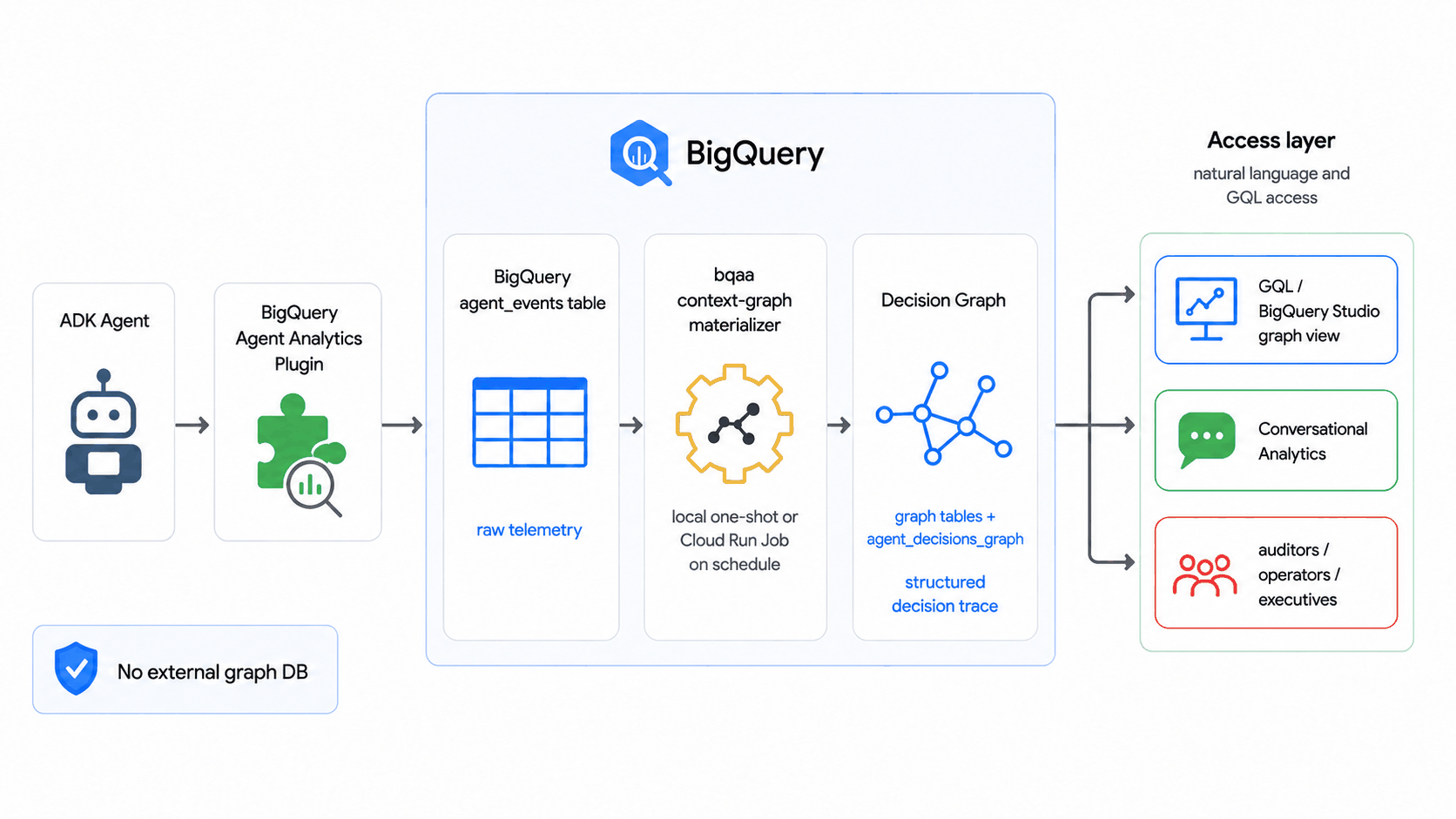
The graph is defined by two declarative artifacts: your table DDL and a CREATE
PROPERTY GRAPH schema. The SDK's bqaa context-graph --property-graph
command derives the extraction (which entities and relationships to pull, and
their column types) from them plus your live table schemas. No separate ontology
or binding file is required for the common case; reach for an explicit
ontology.yaml / binding.yaml only when you need descriptions to steer the AI
prompt, entity inheritance, derived properties, or column renames.
Run it once locally, or on a schedule as a Cloud Run Job triggered by Cloud Scheduler, with split read-only-events / writable-graph datasets, least-privilege service accounts, structured JSON logs, and Cloud Monitoring alerts. The operational reference (prerequisites, the IAM matrix, recommended schedules, the JSON log shape, monitoring, and teardown) lives in the SDK repo:
- Periodic materialization codelab: Build and query a decision graph end to end.
- Scheduled deploy runbook: Take that graph to a hands-off scheduled deploy.
- Deploy reference (Cloud Run + Cloud Scheduler): The full IAM matrix, schedules, monitoring, and the Terraform module.
Deploy to Agent Runtime with the plugin
You can deploy an agent with the BigQuery Agent Analytics plugin to Agent Runtime. This section walks through the steps to deploy using the ADK CLI, and alternatively using the Agent Platform SDK programmatically.
Version Requirement
Use ADK Python version 1.24.0 or higher to deploy with this plugin to Agent Runtime. Earlier versions had an issue where the plugin's asynchronous log writer could be terminated by the serverless runtime before flushing pending events. Starting from 1.24.0, the plugin performs a synchronous flush at the end of each invocation to ensure all events are written.
Prerequisites
Before deploying, ensure you have completed the general Agent Runtime setup, including:
- A Google Cloud project with the Agent Platform API and Cloud Resource Manager API enabled.
- A BigQuery dataset in the target project (or a cross-project dataset with the correct permissions).
- A Cloud Storage staging bucket for deployment artifacts.
- The deploying service account has the IAM roles listed in IAM permissions.
- Your coding environment is
authenticated with
gcloud auth loginandgcloud auth application-default login.
Step 1: Define the agent and plugin
Create your agent project folder with an App object that includes the plugin.
The App object is required for Agent Runtime deployments with plugins.
import os
import google.auth
from google.adk.agents import Agent
from google.adk.apps import App
from google.adk.models.google_llm import Gemini
from google.adk.plugins.bigquery_agent_analytics_plugin import (
    BigQueryAgentAnalyticsPlugin,
    BigQueryLoggerConfig,
)
from google.adk.tools.bigquery import BigQueryToolset, BigQueryCredentialsConfig

# --- Configuration ---
PROJECT_ID = os.environ.get("GOOGLE_CLOUD_PROJECT", "your-gcp-project-id")
DATASET_ID = os.environ.get("BQ_DATASET", "agent_analytics")
# BQ_LOCATION is the BigQuery dataset location (multi-region "US"/"EU" or
# a single region like "us-central1"). This is separate from the Agent Platform
# region used by GOOGLE_CLOUD_LOCATION.
BQ_LOCATION = os.environ.get("BQ_LOCATION", "US")

os.environ["GOOGLE_GENAI_USE_ENTERPRISE"] = "True"

# --- Plugin ---
bq_analytics_plugin = BigQueryAgentAnalyticsPlugin(
    project_id=PROJECT_ID,
    dataset_id=DATASET_ID,
    location=BQ_LOCATION,
    config=BigQueryLoggerConfig(
        batch_size=1,
        batch_flush_interval=0.5,
        log_session_metadata=True,
    ),
)

# --- Tools ---
credentials, _ = google.auth.default(
    scopes=["https://www.googleapis.com/auth/cloud-platform"]
)
bigquery_toolset = BigQueryToolset(
    credentials_config=BigQueryCredentialsConfig(credentials=credentials)
)

# --- Agent ---
root_agent = Agent(
    model=Gemini(model="gemini-flash-latest"),
    name="my_bq_agent",
    instruction="You are a helpful assistant with access to BigQuery tools.",
    tools=[bigquery_toolset],
)

# --- App (required for Agent Runtime with plugins) ---
app = App(
    name="my_bq_agent",
    root_agent=root_agent,
    plugins=[bq_analytics_plugin],
)
google-adk[bigquery-analytics]>=2.7.0
opentelemetry-api
opentelemetry-sdk
Step 2: Deploy using ADK CLI
Use the adk deploy agent_engine command to deploy the agent. The --adk_app
flag tells the CLI which App object to use:
PROJECT_ID=your-gcp-project-id
LOCATION=us-central1

adk deploy agent_engine \
    --project=$PROJECT_ID \
    --region=$LOCATION \
    --staging_bucket=gs://your-staging-bucket \
    --display_name="My BQ Analytics Agent" \
    --adk_app=agent.app \
    my_bq_agent
--adk_app flag
The --adk_app flag specifies the module path and variable name of the
App object (in the format module.variable). In this example, agent.app
refers to the app variable in agent.py. This ensures the deployment
correctly picks up the plugin configuration.
Once successfully deployed, you should see output like:
AgentEngine created. Resource name: projects/123456789/locations/us-central1/reasoningEngines/751619551677906944
Note the Resource name for the next step.
Step 3: Test the deployed agent
After deployment, you can query the agent using the Agent Platform SDK:
import uuid
import vertexai

PROJECT_ID = "your-gcp-project-id"
LOCATION = "us-central1"
AGENT_ID = "751619551677906944"  # from deployment output

vertexai.init(project=PROJECT_ID, location=LOCATION)
client = vertexai.Client(project=PROJECT_ID, location=LOCATION)

agent = client.agent_engines.get(
    name=f"projects/{PROJECT_ID}/locations/{LOCATION}/reasoningEngines/{AGENT_ID}"
)

user_id = f"test_user_{uuid.uuid4().hex[:8]}"
for chunk in agent.stream_query(
    message="List datasets in my project", user_id=user_id
):
    print(chunk, end="", flush=True)
Step 4: Verify events in BigQuery
After sending a few queries to the deployed agent, verify that events are being logged by querying your BigQuery table:
SELECT timestamp, event_type, agent, content
FROM `your-gcp-project-id.agent_analytics.agent_events`
ORDER BY timestamp DESC
LIMIT 20;
You should see events such as INVOCATION_STARTING, LLM_REQUEST,
LLM_RESPONSE, TOOL_STARTING, TOOL_COMPLETED, and INVOCATION_COMPLETED.
Alternative: Deploy using the Agent Platform SDK
You can also deploy programmatically using the Agent Platform SDK directly. This is useful for CI/CD pipelines or custom deployment workflows:
import vertexai
from my_bq_agent.agent import app

PROJECT_ID = "your-gcp-project-id"
LOCATION = "us-central1"
STAGING_BUCKET = "gs://your-staging-bucket"

vertexai.init(
    project=PROJECT_ID, location=LOCATION, staging_bucket=STAGING_BUCKET
)
client = vertexai.Client(project=PROJECT_ID, location=LOCATION)

remote_app = client.agent_engines.create(
    agent=app,
    config={
        "display_name": "My BQ Analytics Agent",
        "staging_bucket": STAGING_BUCKET,
        "requirements": [
            "google-adk[bigquery-analytics]>=2.7.0",
            "google-cloud-aiplatform[agent_engines]",
            "opentelemetry-api",
            "opentelemetry-sdk",
        ],
    },
)
print(f"Deployed agent: {remote_app.api_resource.name}")
Troubleshooting
If events are not appearing in your BigQuery table after deployment:
-
Check ADK version and extra: Ensure
google-adk[bigquery-analytics]>=2.7.0is in your requirements. The extra installs the Storage Write API, Cloud Storage, andpyarrowdependencies required by the plugin. -
Enable debug logging: Add the following to the top of your
agent.pyto surface any silent errors: -
Check IAM permissions: The Agent Runtime service account needs
roles/bigquery.dataEditoron the target table androles/bigquery.jobUseron the project. For cross-project logging, also ensure the BigQuery API is enabled in the source project and the service account hasbigquery.tables.updateDataon the destination table. -
Verify plugin initialization: In Cloud Logging, filter by
resource.type="reasoning_engine"and look for plugin startup messages or error logs. -
Use immediate flush for debugging: Set
batch_size=1andbatch_flush_interval=0.1inBigQueryLoggerConfigto rule out buffering issues.
Security: Avoid logging sensitive credentials
Do not log OAuth tokens, API keys, or client secrets
The BigQuery Agent Analytics plugin captures detailed event payloads, including tool arguments, LLM prompts, and authentication-related events (such as HITL credential requests). Built-in redaction covers common key names and credential patterns, but it is not a general data-loss prevention system. A secret under an application-specific key or in unrelated free-form text can still be written to BigQuery.
The plugin includes built-in redaction that automatically protects common secrets. For additional control, you can layer custom redaction on top.
Built-in redaction
The Python plugin normalizes key names to lowercase and treats hyphens like
underscores. It recursively replaces values with [REDACTED] for these keys
wherever they appear in structured content or attributes:
client_secret, access_token, refresh_token, id_token, api_key,
password, private_key, proxy_authorization, google_access_id, sig,
signature, token, secret, authorization, x_api_key,
x_amz_credential, x_amz_signature, x_goog_credential,
x_goog_security_token, x_goog_signature
Any key prefixed with temp: is also replaced with [REDACTED], including
in session state and state_delta. A secret: prefix is not treated as a
special prefix; use the temp: scope or a custom formatter for
application-specific secret scopes.
The plugin also sanitizes credential patterns in error_message, agent and run
tracebacks, and external URIs. This includes authorization headers, bearer and
basic credentials, signed-URL query parameters, and key/value fragments that
use the sensitive names above. Encoded credential constructs that cannot be
safely rewritten fail closed.
No configuration required
Built-in redaction is always active for structured attributes and state
logging, and applies recursively to nested dictionaries and JSON-encoded
strings within attribute values. Custom content_formatter runs first
on raw content. If it raises or returns an unsupported type, Python writes
[FORMATTER_FAILED] instead of the original content and increments the
formatter_failed incident counter.
Built-in redaction in Java
The Java plugin includes built-in redaction in v1.7.0 and later.
It redacts client_secret, access_token, refresh_token, id_token,
api_key, and password (case-insensitive) recursively across the
assembled attributes tree, including session state and state deltas, and
any key prefixed with temp:. Keep secrets out of other state scopes or
mask them with a custom contentFormatter.
A custom Java contentFormatter must be thread-safe (it is called
concurrently across invocations) and fast/non-blocking (it runs on the
event-processing path), and it must return a new object rather than
mutating the content it receives. If it throws, the Java plugin drops the
row's content (fail-closed) rather than logging the unformatted payload.
Use content_formatter to redact additional secrets
Provide a custom content_formatter function in BigQueryLoggerConfig to strip
or mask sensitive fields before they are written:
import json
import re
from typing import Any

SENSITIVE_KEYS = {"client_secret", "access_token", "refresh_token", "api_key", "secret"}

def redact_credentials(event_content: Any, event_type: str) -> str:
    """Redact OAuth secrets and tokens from logged content."""
    if isinstance(event_content, dict):
        text = json.dumps(event_content)
    else:
        text = str(event_content)

    for key in SENSITIVE_KEYS:
        # Redact values in JSON-like strings: "client_secret": "GOCSPX-xxx"
        text = re.sub(
            rf'("{key}"\s*:\s*)"[^"]*"',
            rf'\1"[REDACTED]"',
            text,
            flags=re.IGNORECASE,
        )
    return text

config = BigQueryLoggerConfig(
    content_formatter=redact_credentials,
    # ... other options
)
import com.google.adk.agents.LlmAgent;
import com.google.adk.models.Gemini;
import com.google.adk.models.LlmRequest;
import com.google.adk.models.LlmResponse;
import com.google.adk.runner.Runner;
import com.google.genai.types.Content;
import com.google.genai.types.GenerateContentConfig;
import com.google.genai.types.Part;
import java.util.ArrayList;
import java.util.List;

public final class AgentContentFormatter {
  private static final String PROJECT_ID = "your-gcp-project-id";
  private static final String DATASET_ID = "your-gcp-dataset_id";
  private static final String TABLE_ID = "your-gcp-table";
  private static final String API_KEY = "your-api_key";
  private static final String GCS_BUCKET_NAME = "your-gcs-bucket-name";

  /** Returns the formatter logic you want to test. */
  private static Object formatter(Object content, String eventType) {
    if (content instanceof LlmRequest req) {
      List<Content> maskedContents = new ArrayList<>();
      for (Content c : req.contents()) {
        maskedContents.add(maskContent(c));
      }
      return req.toBuilder().contents(maskedContents).build();
    } else if (content instanceof LlmResponse res) {
      if (res.content().isPresent()) {
        return res.toBuilder().content(maskContent(res.content().get())).build();
      }
      return res;
    } else if (content instanceof Content content2) {
      return maskContent(content2);
    } else if (content instanceof Map<?, ?> map) {
      Map<Object, Object> maskedMap = new LinkedHashMap<>();
      for (Map.Entry<?, ?> entry : map.entrySet()) {
        maskedMap.put(entry.getKey(), formatter(entry.getValue(), eventType));
      }
      return maskedMap;
    }
    return content;
  }

  private static Content maskContent(Content originalContent) {
    if (originalContent.parts().isPresent()) {
      List<Part> maskedParts = new ArrayList<>();
      for (Part part : originalContent.parts().get()) {
        if (part.text().isPresent() && part.text().get().contains("secret")) {
          String maskedText = part.text().get().replace("secret", "****");
          maskedParts.add(part.toBuilder().text(maskedText).build());
        } else {
          maskedParts.add(part);
        }
      }
      return originalContent.toBuilder().parts(maskedParts).build();
    }
    return originalContent;
  }

  public static void main(String[] args) throws Exception {
    // 1. Setup Config with custom formatter
    BigQueryLoggerConfig config =
        BigQueryLoggerConfig.builder()
            .projectId(PROJECT_ID)
            .datasetId(DATASET_ID)
            .tableName(TABLE_ID)
            .gcsBucketName(GCS_BUCKET_NAME)
            .contentFormatter(AgentContentFormatter::formatter)
            .logMultiModalContent(true)
            .build();

    // 2. Setup Plugin
    BigQueryAgentAnalyticsPlugin plugin = new BigQueryAgentAnalyticsPlugin(config);

    // 3. Setup Agent that responds
    LlmAgent agent =
        LlmAgent.builder()
            .model(
                Gemini.builder()
                    .modelName("gemini-3-flash-preview") // use appropriate model
                    .apiKey(API_KEY)
                    .build())
            .name("bq_demo_agent")
            .instruction("You are a helpful assistant")
            .generateContentConfig(GenerateContentConfig.builder().temperature(0.5f).build())
            .build();

    // 4. Setup Runner
    Runner runner = Runner.builder().agent(agent).appName("test_app").plugins(plugin).build();
    // 5. Use runner to run some scenarios
    ...
  }

  private AgentContentFormatter() {}
}
Use event_denylist to skip credential events
If you do not need to log authentication-related events, exclude them entirely:
General best practices
- Never hardcode secrets in agent source code. Use environment variables or a secret manager (e.g., Google Cloud Secret Manager) for OAuth client secrets and API keys.
- Restrict BigQuery table access using IAM to limit who can read logged event data.
- Audit your logs periodically to verify no unexpected sensitive data is being captured.
Operations
Tracing and observability
The plugin populates the trace_id, span_id, and parent_span_id columns on
every emitted row so the parent-child execution tree (Agent → LLM call / Tool
call) reconstructs cleanly from BigQuery.
- Internal span tracking, no OTel span export. The plugin tracks the
parent-child hierarchy on its own internal stack of 16-hex
span_idvalues. The root invocation span reuses the ambient OTel span's id when one is active (so it lines up with the runner's invocation span); child BQAA spans are generated internally. It does not calltracer.start_span(...)on any configured OpenTelemetryTracerProvider, so its instrumentation never reaches your configured exporter. This is what prevents duplicate spans in Cloud Trace when Agent Engine telemetry is enabled (GOOGLE_CLOUD_AGENT_ENGINE_ENABLE_TELEMETRY=true) or when you wire any other Cloud Trace exporter into the host process. The same internal, ID-only span tracking applies to the Java plugin in v1.7.0 and later; earlier Java builds created plugin-owned OpenTelemetry spans that could surface as duplicates next to framework spans. trace_idinherited from the ambient OTel span when present. If the surrounding runtime has already started an OTel span, such as Agent Engine's invocation span, the ADKRunnerinvocation span, or any span you opened before the agent runs. The plugin reads itstrace_idand stamps it on every BigQuery row. BigQuery rows therefore join cleanly to your existing Cloud Trace traces via a sharedtrace_id.- Fallback when no ambient span is present. If no ambient OTel span is
active (e.g. a non-Agent-Engine deployment with no host-side tracer
configured), the plugin generates a per-invocation 32-hex
trace_id(the Java plugin falls back to the ADK invocation ID as thetrace_id) so the parent-child hierarchy is always preserved in BigQuery, even without any external tracer setup. - No
TracerProvideris required. Configuring an OpenTelemetryTracerProviderin your host process is optional. It only matters if you want the plugin'strace_idto be sourced from your own pre-existing ambient span (e.g. to correlate against telemetry from non-ADK services). The plugin no longer needs the provider for its own bookkeeping.
If you relied on the plugin to feed your OTel exporter
Some older configurations used the BQAA plugin as a side channel for
OpenTelemetry span emission; that path is intentionally gone. Configure
OTel instrumentation in the host application instead (Agent Engine wires
this automatically; for local deployments use ADK's own framework
instrumentation or an explicit TracerProvider). The plugin's BigQuery
rows will continue to join to your traces via trace_id.
Public methods
The plugin exposes several public methods for lifecycle management:
await plugin.flush(): Wait for pending events associated with the current event loop to finish writing.await plugin.shutdown(timeout=None): Gracefully shut down the plugin, flushing pending events and releasing resources. The optionaltimeoutparameter overridesshutdown_timeoutfrom the config.await plugin.close(): Run the plugin-manager lifecycle contract. It delegates toshutdown()and is called automatically when a runner closes its plugins.await plugin.create_analytics_views(): Manually (re-)create all per-event-type analytics views. Useful after a schema upgrade or when views need to be refreshed.plugin.get_drop_stats(): Return a snapshot of delivery-loss and content-sanitization incident counts per reason. See Dropped-event observability below.-
Async context manager: The plugin supports
async withfor automatic startup and shutdown:
In Java, the plugin lifecycle is managed via the close() method (inherited from Plugin), which returns an RxJava Completable.
plugin.close(): Gracefully shuts down the plugin, flushing pending events and releasing resources (including the BigQuery write client and executors).- Automatic Closure: If you are using
InMemoryRunner, callingrunner.close()will automatically close all registered plugins, including the BigQuery Agent Analytics plugin. plugin.getDropStats()(v1.7.0+): Returns anImmutableMap<String, Long>of dropped-event counts per drop reason. See Dropped-event observability.- JVM shutdown hook (v1.7.0+): The plugin registers
a shutdown hook at construction, so pending events are drained
(best-effort, bounded by
shutdownTimeout) at JVM exit even ifclose()is never called. An explicitclose()deregisters the hook. Still prefer callingclose()for a deterministic flush.
Dropped-event observability
BigQuery logging is best-effort. Events can be dropped when the in-memory queue overflows, setup is unavailable, shutdown races a callback, or a write ultimately fails. The plugin also counts formatter and parser failures where the row is written with a sentinel in place of its content. The counters persist across loop cleanup and shutdown.
Drop reasons (Python):
| Reason | Cause |
|---|---|
queue_full |
The in-memory batch queue overflowed (host produces events faster than the drainer can ship). Increase queue_max_size on BigQueryLoggerConfig, raise batch_size to drain in larger chunks, or scale the consumer side (more concurrent invocations finishing faster). |
arrow_prep_failed |
A row could not be converted to its Arrow representation (typically schema/type mismatch). Inspect logs for the offending field. |
retry_exhausted |
The Storage Write API call kept returning a retryable error (e.g. transient gRPC failures) until the retry budget was used up. |
non_retryable |
Storage Write API returned a non-retryable error (permissions, quota, schema rejection). Usually requires operator intervention. |
unexpected_error |
Any other exception caught while preparing or writing the batch. |
shutdown_timeout |
Rows remained queued when a bounded shutdown or close timed out. |
shutdown_cancelled |
Rows remained queued when shutdown was cancelled by the host, such as by an outer close timeout. |
offset_conflict |
In exactly_once_delivery mode, a committed stream rejected an offset or a replacement stream was unavailable. |
setup_unavailable |
A row could not be admitted because plugin setup failed or remained in retry backoff. |
shutdown_race |
A callback attempted to admit a row while shutdown was starting or in progress. |
stale_loop |
Queued rows belonged to an event loop that had already closed and could no longer drain them. |
formatter_failed |
The custom formatter failed or returned an unsupported type. The row is still written with [FORMATTER_FAILED]; this is an incident count, not a dropped-row count. |
content_parse_failed |
Content parsing failed. The row is still written with [CONTENT_PARSE_FAILED]; this is an incident count, not a dropped-row count. |
Drop reasons (Java, v1.7.0+):
| Reason | Cause |
|---|---|
queue_full |
The in-memory batch queue overflowed. Increase queueMaxSize on BigQueryLoggerConfig, raise batchSize, or scale the consumer side. |
append_error |
Batch preparation or append failed for a cause other than AppendSerializationError, including timeouts, exhausted or non-retryable writes, and unexpected conversion failures. |
serialization_error |
A row could not be serialized for the write stream (typically a schema/type mismatch). Inspect logs for the offending field. |
after_close |
A row reached an already-closed per-invocation processor. |
shutdown_timeout |
Queued rows remained when the bounded final drain expired. |
writer_permit_exhausted |
The live-writer safety cap was exhausted, normally during a Storage Write outage or delayed cleanup. |
writer_create_error |
StreamWriter construction or processor startup failed. |
late_after_finalize |
Async work completed after its invocation was finalized or while the plugin was closing. |
Reading the counts:
# Snapshot of {reason: count} since plugin start.
stats = plugin.get_drop_stats()
# Example: {"queue_full": 12, "retry_exhausted": 0,
#           "formatter_failed": 1, ...}

loss_reasons = {
    "queue_full", "arrow_prep_failed", "retry_exhausted",
    "non_retryable", "unexpected_error", "shutdown_timeout",
    "shutdown_cancelled", "offset_conflict", "setup_unavailable",
    "shutdown_race", "stale_loop",
}
total_rows_lost = sum(stats.get(reason, 0) for reason in loss_reasons)
// Snapshot of {drop_reason: count} since plugin start.
ImmutableMap<String, Long> stats = plugin.getDropStats();
// Example: {queue_full=12, append_error=0, serialization_error=0,
//           after_close=0, shutdown_timeout=0, writer_permit_exhausted=0,
//           writer_create_error=0, late_after_finalize=0}

long totalDropped = stats.values().stream().mapToLong(Long::longValue).sum();
Exporting to your monitoring system: Poll periodically and ship the deltas:
import asyncio

async def export_loop(plugin):
    last = {}
    while True:
        current = plugin.get_drop_stats()
        for reason, count in current.items():
            delta = count - last.get(reason, 0)
            if delta:
                # e.g. metric_client.write_point(
                #         metric="bqaa_dropped_events",
                #         labels={"reason": reason}, value=delta)
                ...
        last = current
        await asyncio.sleep(60)
Alert on every non-zero reason. Most reasons mean rows were lost before reaching
BigQuery. The formatter_failed and content_parse_failed reasons instead mean
the row landed with sentinel content, so alert on them as privacy or data
quality incidents. Sustained queue_full, retry_exhausted, non_retryable,
or offset_conflict counts generally indicate throughput, delivery, or Storage
Write health problems. In Java, the comparable write-error bucket is
append_error.
Multiprocessing and fork safety
The Python plugin is fork-aware: it sets GRPC_ENABLE_FORK_SUPPORT=1 before
loading the gRPC C-core library and registers an os.register_at_fork handler
that resets inherited runtime state (gRPC channels, write streams, event loops)
in child processes. This means the plugin can survive os.fork() without
leaking file descriptors or sending data on a parent's connection.
However, spawn is the recommended multiprocessing start method for
production deployments. fork copies the parent's address space, including any
in-flight gRPC state, and the post-fork reset adds latency to the first write in
each child. With spawn, each worker initializes the plugin cleanly.
For Gunicorn deployments specifically:
- Prefer
--preloadcombined with lazy plugin initialization (the plugin defers setup until the first event is logged), or - Initialize the plugin inside a
post_forkhook so each worker gets its own client.
Note
The fork-safety mechanism resets runtime state only. It does not replay
events that were queued but not yet flushed in the parent process at the
time of fork. Call await plugin.flush() before forking if you need to
guarantee delivery.
Additional ways to consume logged data
BigQuery Agent Analytics SDK
The BigQuery Agent Analytics SDK provides a programmatic way to consume and analyze the data logged by the plugin. Use the SDK for:
- Agent evaluation: Compare agent runs against expected outcomes
- Golden trajectory matching: Validate that agent execution paths match approved sequences
- Trace visualization: Reconstruct and visualize agent execution flows from logged spans
Build a dashboard
Visualize your agent's performance data with a ready-made Looker dashboard, or build your own from the example notebook.
Looker Block
The BigQuery Agent Analytics Looker Block provides a ready-to-use dashboard for monitoring, debugging, and optimizing your agents, with insights into interactions, tool usage, LLM performance, and cost footprints. It surfaces:
- Aggregate metrics: token consumption, user engagement, and tool execution volumes.
- System health: P50–P99 latency distributions and tool failure tracking to help you pinpoint bottlenecks.
- Interactive drilldowns: click a metric to open context-aware visualizations for root-cause analysis.
The block uses a Native Derived Table architecture that parses the logged JSON payloads directly, so no additional data pipelines are required. To get started, install it for free from the Looker Marketplace and point it at your BigQuery project ID, dataset name, and base table name.
Custom dashboard from a notebook
The BigQuery Agent Analytics SDK includes an example Jupyter notebook that demonstrates how to query and visualize your agent's performance data. Use it as a starting point to build your own custom dashboards tailored to your BigQuery Agent Analytics dataset. You can also publish the notebook as an interactive dashboard using Colab Data Apps.
Feedback
We welcome your feedback on BigQuery Agent Analytics. If you have questions, suggestions, or encounter any issues, please reach out to the team at bqaa-feedback@google.com.